
Starting with the iPhone XS, most Apple smartphones support eSIM and store multiple accounts (except for some regional and carrier-locked models). However, technological capabilities may differ depending on the line and the country of sale. So, you need to know the functionality of your smartphone for travel planning or business trips.
In this article, we will look at how many eSIMs iPhone can have, how to activate multiple SIMs on your smartphone, and how to use different lines.
How many eSIMs can iPhone have based on the model
iPhone models younger than iPhone XR and iPhone XS series, including iPhone XS, XR, XS Max, SE, 11, 12, 13, 14, 15, 16, 17, and 18, supporting digital SIM card technology, have 1 or 2 active eSIMs, which you can use simultaneously (iPhone SE 3 and iPhone 13 or later actually support two active eSIMs). It is called Dual Active. E.g.:
- eSIM 1: Your primary phone number for personal use.
- eSIM 2: An Ohayu eSIM to connect to foreign mobile networks and get internet while traveling.
While most models have 2 active eSIMs with up to 8 profiles in memory, the features may differ from model to model. Here is information for each iPhone line, from XS to 16.
iPhone 17
With the iPhone 17 line, Apple has continued its shift toward eSIM-only models in major markets. In the US, devices ship without a physical SIM tray, while most global versions still keep one. The iPhone 17 can run 2 active eSIMs at the same time and store 8-12 eSIM profiles in memory – an upgrade from the iPhone 16’s 8. This makes switching between local carriers and travel eSIMs even smoother. For travelers, it means you can keep a personal line, a work number, and multiple country-specific plans ready without deleting older profiles.
iPhone 16
iPhone 16 has 2 active eSIMs at the same time. In addition, the device stores 8 or more accounts, so you may quickly switch between them as needed.
iPhone 15
In the iPhone 15, you may use up to 8 or more eSIMs, with only 2 active ones. Models sold in the United States do not have a physical tray and support only embedded cards. Smartphones outside of the US have both options. This way, you may activate two lines: one embedded SIM and one physical SIM.
iPhone 14
The iPhone 14 carries up to 8 profiles, but only 2 of them are available at a time.
As for the availability of a slot for a physical card, it depends on the model and country of manufacture. For example, the device in the United States is sold without a physical slot. Global versions (for Europe and other regions) have 1 slot for a physical card and technology for eSIM.
iPhone 13
iPhone 13 supports up to 2 eSIMs at a time. Since all 13 models have a physical slot and eSIMs, they work with Dual SIM. This model has up to 8 profiles simultaneously in the device’s memory.
iPhone 12
12 models support one active eSIM with one physical SIM. They can also store up to 20 eSIMs in the memory (8 or more for different device versions). Although the device has many lines, in practice, it allows you to work with two lines in a combination of embedded and nano-SIM.
iPhone 11
11 models have up to 20 profiles, but they use only one active eSIM with one physical SIM at the same time. If you need two accounts, you need to connect a nano-SIM as an additional line.
iPhone SE
In the SE line, the functionality depends on the generation:
- SE 2022 (3rd generation) – 2 eSIMs active at the same time or 1 eSIM + 1 physical SIM.
- SE 2020 (2nd generation) – only 1 eSIM + 1 physical SIM.
- SE 2016 (1st generation) – does not support embedded accounts at all, only a physical SIM.
iPhone XS, XR, XS Max
These models are the first to support eSIM, but they do have some limitations. They have only 1 embedded and 1 physical SIM at a time. However, you may store 8 or more accounts on the smartphone.
iPhones that do NOT support eSIM
iPhone models older than the iPhone XR and iPhone XS series do not have digital SIM cards.
- iPhone 8, 8 Plus
- iPhone 7, 7 Plus
- iPhone 6s, 6s Plus
- iPhone SE (1st generation)
- iPhone 6, 6 Plus
- iPhone 5s and earlier
How to activate two eSIMs on your iPhone?
Apple allows you to apply two embedded cards on the device at the same time, starting with the 13 series. This way, you have two active numbers at the same time. Thus, you will combine work and personal contacts in one smartphone, connect a travel account without losing the settings of the base card, and quickly switch between them. Here is what you need to activate.
Check if the smartphone supports 2 active eSIMs
Before you begin, check to see if the device connects two lines at the same time:
- Models that support two active eSIMs: iPhone SE 3, 13, 14, 15, 16, 176, 18 (except for China, Hong Kong, and Macau models).
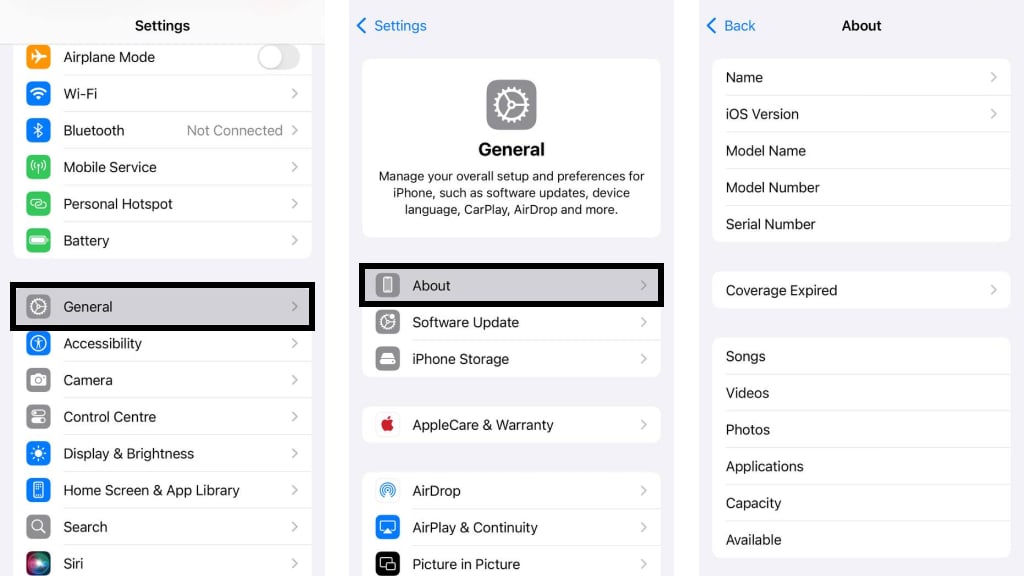
- To find out the exact model, go to Settings → General → About.
Get access from the operator
To add an account, you need to contact your mobile operator. They provide packages in the following formats:
- QR code for scanning;
- SM-DP+ address and activation code for manual entry of parameters;
- downloading via the operator’s app.
Add the first eSIM
Go to Settings → Mobile Service → Add eSIM.
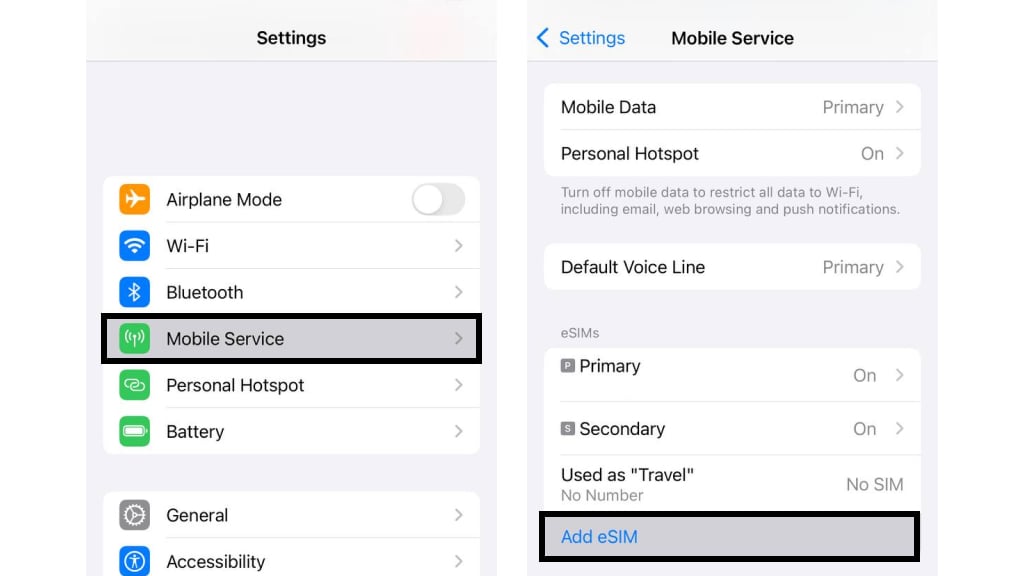
Next, you will be able to choose how to apply the profile:
- If you have a QR code, scan it with a camera.
- If you have data for manual entry, select Enter details manually and enter the parameters provided by the operator.
- Confirm the installation and wait for its activation.
Add a second eSIM
To add the next line, repeat the same steps. Make sure that both accounts are active.
Set up both cards
After activating two cards, you need to specify how they will be used.
Assign numbers
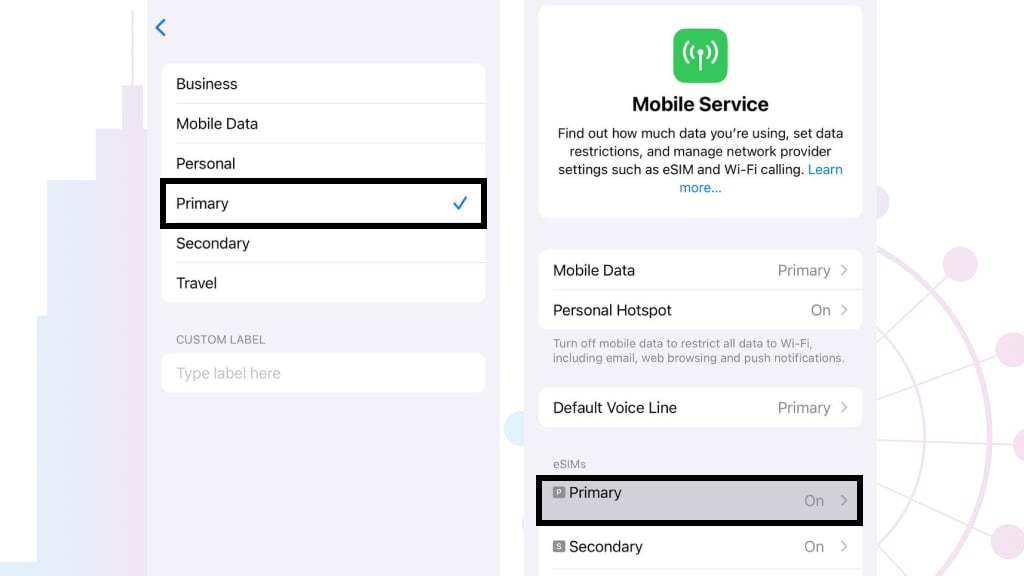
- Open Settings → Mobile Data.
- Select each option and click Mobile Plan Label.
- There are options for names for lines, such as Personal/Business, Primary/Secondary, and Travel.
- Choose names for both profiles or create a Custom Label.
- In the Default Voice Line section, select which account will be used by default for calls and SMS.
Select a number for mobile internet
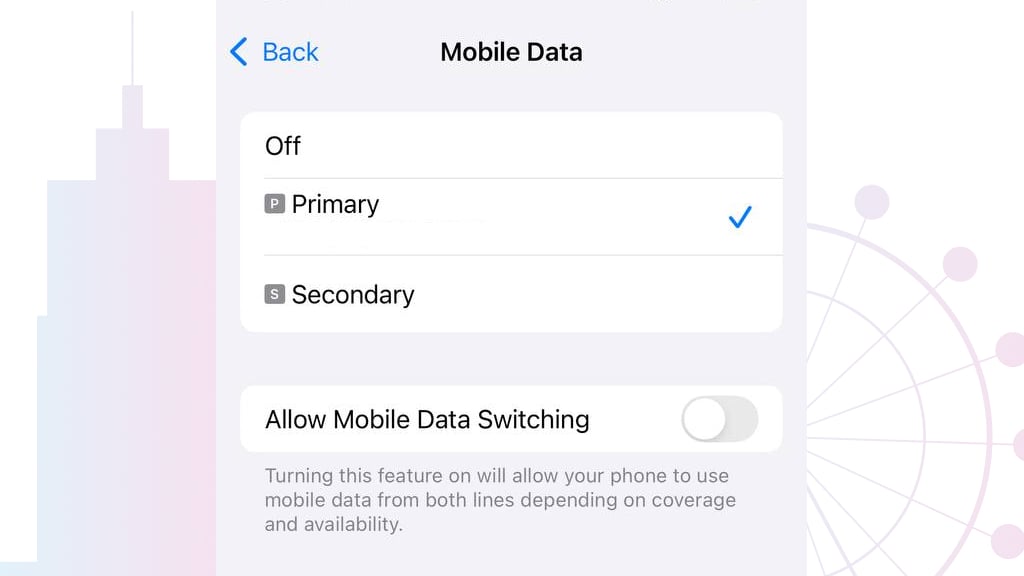
Select Mobile Data and specify which number will be applied for the Internet.
You may also turn on Allow Mobile Data Switching so your iPhone can use cellular data from either line, depending on coverage and availability.
Switch between eSIMs
If you need to change the number for calls or the Internet, go to Settings → Mobile Data. Select the number you want for calls, SMS, or cellular internet.
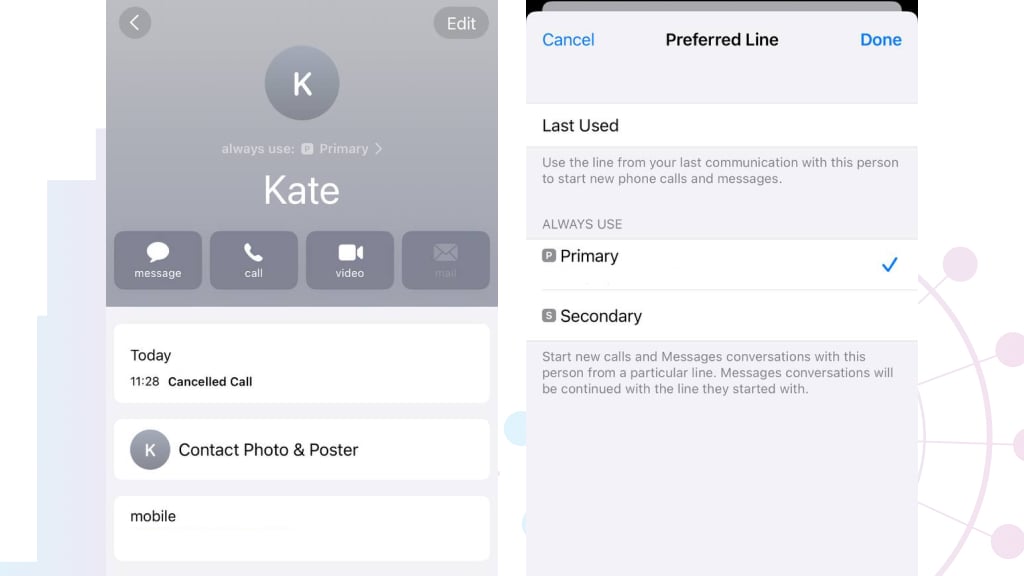
You can also quickly select a card before making a call:
- Open Contacts.
- Click the “i” next to the contact and select the number from which you want to make the call.
When do you need multiple eSIMs?
Multiple active cards on the smartphone are a top feature for many cases, from work to travel. Here are some of the most common situations.
Business and personal numbers on one phone
Who can use it: entrepreneurs, freelancers, and office workers.
Thanks to the ability to support multiple profiles, you can replace a second mobile phone for work calls. Thus, you may use the first one for personal needs, such as calls to family and friends, social networks, and banking. The second one will be for work, including communication with clients and partners. During weekends, you may deactivate your work number to avoid receiving calls and messages.
Mobile internet
Who can use it: Those who use mobile data a lot.
If you need a lot of mobile data, you may activate two tariffs at once or choose a more favorable option for calls, SMS, and the Internet. It is especially relevant for those who work remotely or travel within the same country.
Traveling
Who can use it: Travelers, digital nomads, and students abroad.
If you want to reduce home operator roaming charges on mobile internet while still getting connected to local networks abroad, consider getting an eSIM from a local operator in the country you are traveling to. You may choose and buy a plan in advance.
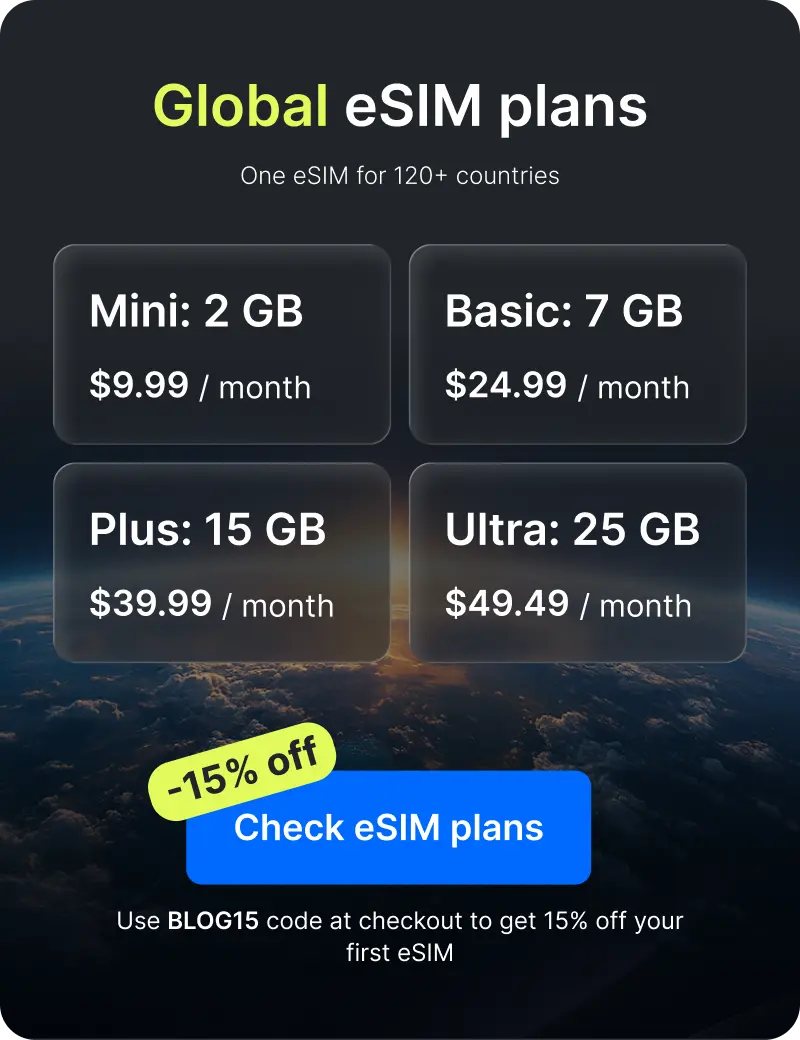
Ohayu has plans for 170+ countries and a Global eSIM, which automatically switches networks when you cross borders, and gives you internet in 120+ countries from $9.99/month. You can activate the package online using a QR code in the app.
Final words
When answering how many eSIMs an iPhone can have, we should consider the smartphone’s model and series. The main thing: most iPhone SE 3, 13, 14, 15, 16, 17, 18 series support 2 active SIM cards at the same time while storing 8+ profiles. Series from XS to 12 have 20 profiles, but only one of them is active. Check the details of your smartphone and take advantage of all the benefits of multiple SIMs for your work or travel.