
Xiaomi began integrating embedded SIM technology into its devices in 2019. Today, there is a wide range of Xiaomi eSIM smartphones and even smartwatches, including the Redmi Note, Redmi Watch, T, and Poco lineups.
In this article, we’ll dive into all things eSIM Xiaomi. We’ll review the Xiaomi eSIM phone list and walk you through setting up and activating this technology. And don’t worry – if you run into issues, we’ve got troubleshooting tips to get you back on track.
Which Xiaomi phones support eSIM?
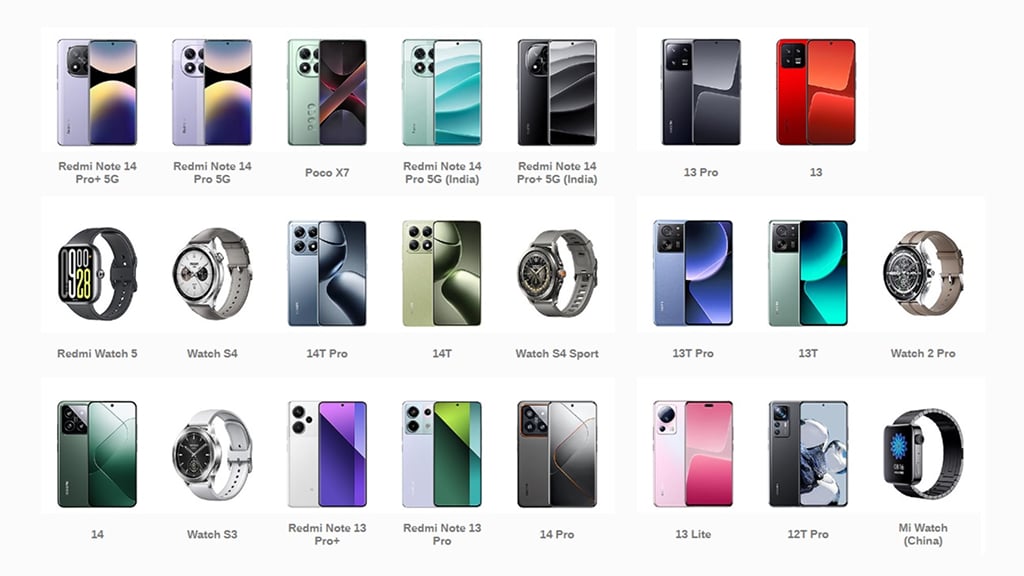
Check the following list of compatible devices to see which Xiaomi has eSIM:
- Xiaomi 15, 15 Pro, 15 Ultra.
- Redmi Note 14 Pro 5G/14 Pro+ 5G
- Redmi Note 14 Pro/14 Pro+
- Redmi Note 13 Pro/13 Pro+
- 17T/17T Pro
- 17/17 Ultra
- 15T/15T Pro
- 14/14 Pro
- 14T/14T Pro
- 13/13 Lite/13 Pro
- 13T/13T Pro
- 12T Pro
- Poco X7
- Redmi Watch 5
- Watch S4
- Watch S4 Sport
- Watch S3
- Watch 2 Pro
- Mi Watch
What was Xiaomi’s first eSIM-compatible device?
It was a smartwatch. The Mi Watch (China), launched in November 2019, is Xiaomi’s debut eSIM-enabled product. It is the first company’s wearable device that allows users to use internet-based apps independently (without pairing with a phone).
Note: The phones and smartwatches above work with an embedded SIM only if your carrier supports it. That depends on where you are and who your carrier is. Therefore, you will have to verify with your carrier to see if it is compatible.
On the other hand, you can check out the official page to find out a list of countries and carriers supporting eSIM for each Xiaomi device.
Why use Xiaomi eSIM?
Xiaomi has always been a pioneer in innovation, and digital SIM is no exception.
- An embedded SIM means no physical SIM is required. No more struggling with the little SIM tray or worrying about losing the card altogether.
- It has finally become quite possible to connect to one or another carrier and remain online when traveling.
- Plus, you enjoy the convenience of dual SIM functionality without sacrificing a second physical slot. It’s a win-win for tech-savvy users who value flexibility and simplicity.
How do I check if my Xiaomi supports eSIM?
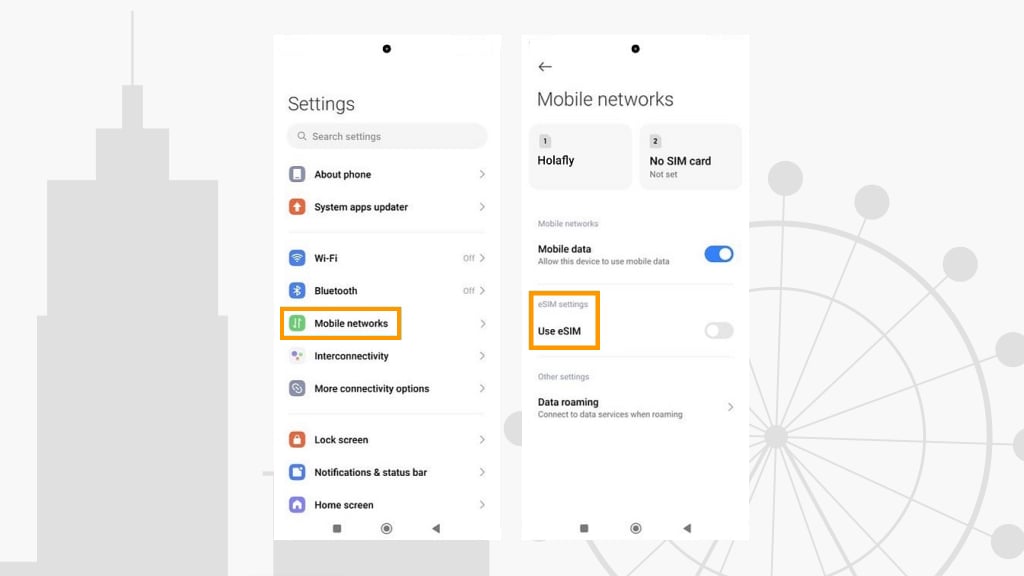
#1 Check eSIM settings
- Go to your Settings.
- Select “Mobile networks”.
- If your device supports eSIM and this feature is available in your region and enabled by your carrier, you will see the “eSIM settings” section.
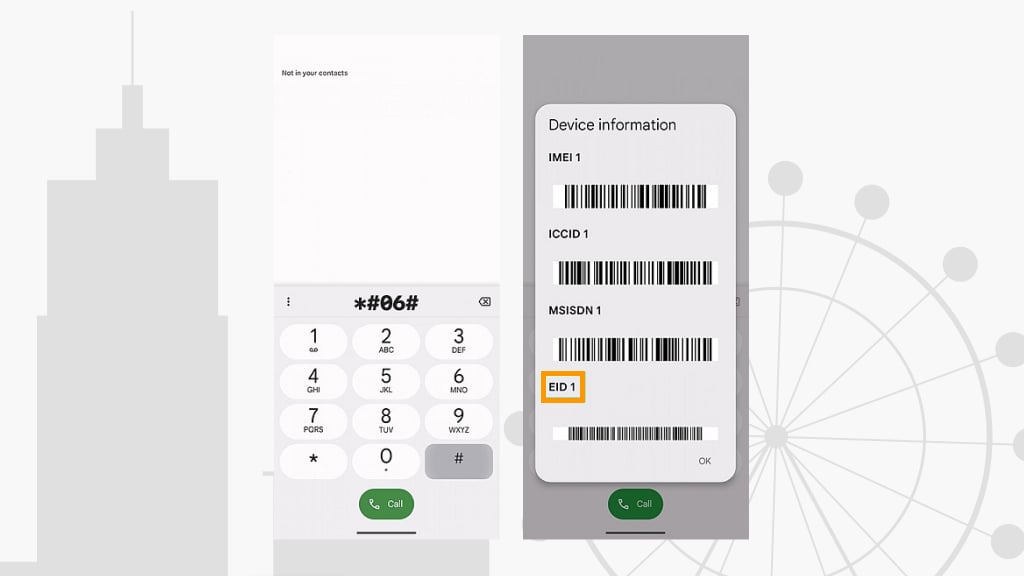
#2 Find EID number
- Dial *#06# from your default Phone app. This is a specific code that displays device information, including IMEI, ICCID, and a serial number.
- If your device is eSIM-equipped, there will be an EID number in the list.
Where to buy eSIM plans for Xiaomi
Buying an eSIM is easy and way more convenient than physical SIM cards, because you can do it online and install right away on your Xiaomi phone.

- First, pick your destination (a country or a Global plan that covers multiple destinations).
- Next, decide on the amount of data. Think about how many gigabytes you’ll need ( 3GB is enough for a week if you just use maps and browse the web, for video and music streaming – choose 5-10 GB).
- Buy it online, install it before your trip while you have Wi-Fi.
- Activate it. Follow a few simple steps (more on this in the next sections).
How to set up Xiaomi eSIM
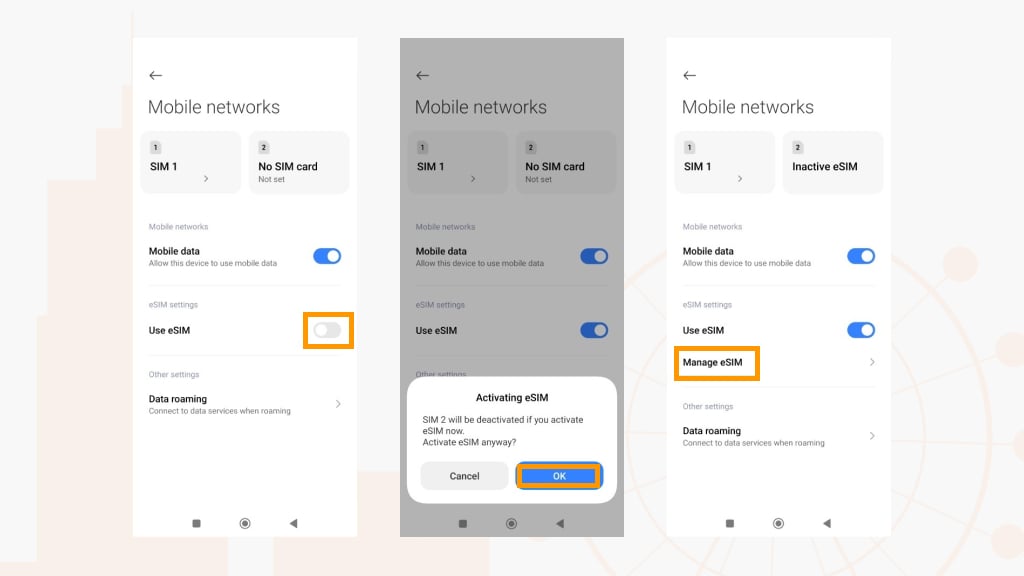
Via QR code
- Under “Mobile networks,” enable the eSIM feature.
- The pop-up window will ask you to activate eSIM – click OK.
- Then go to “Manage eSIM” > “Add eSIM.”
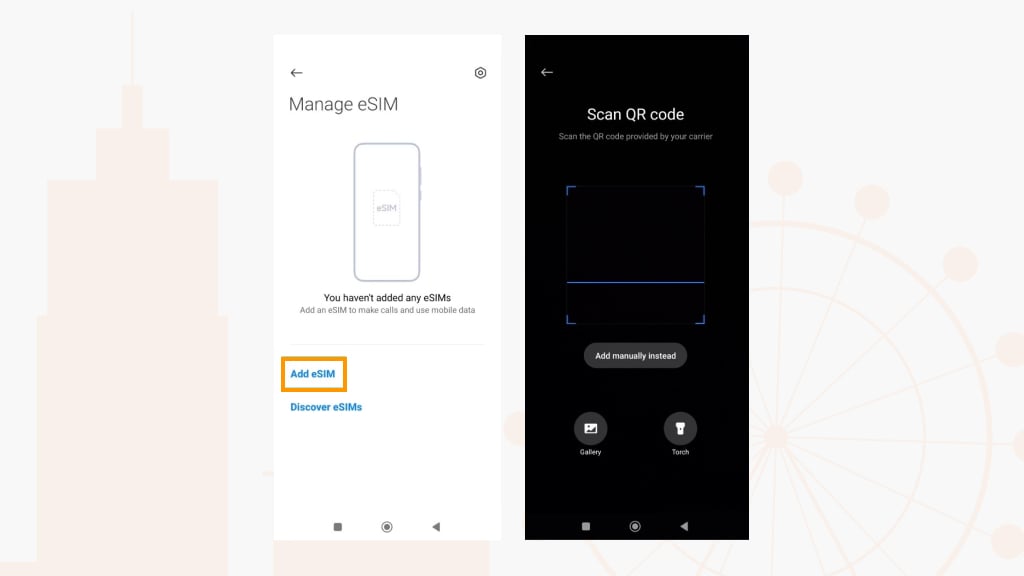
Manually
- In the QR scanning mode, select “Add manually instead.”
- Enter an activation code that a provider sent you.
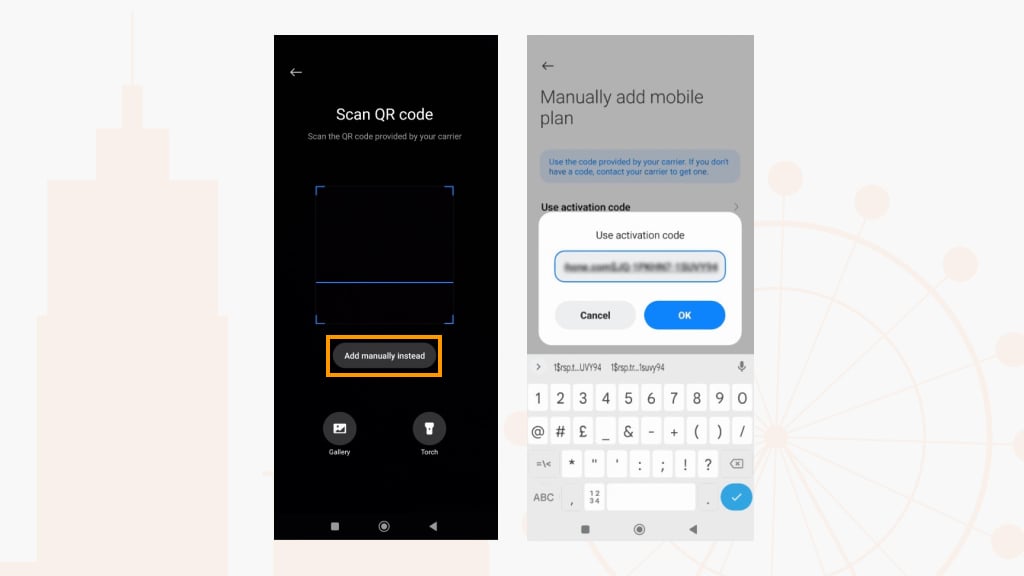
How to activate eSIM on Xiaomi 12T Pro, Xiaomi 13, Xiaomi 13 Pro, and other models
- Once your eSIM has been installed, select it in “Mobile networks” (any SIM – alternative cards – must be disabled).
- Turn your eSIM on and return to “Mobile networks.”
- Click “Data roaming”.
- Set “Always” next to “International roaming.”
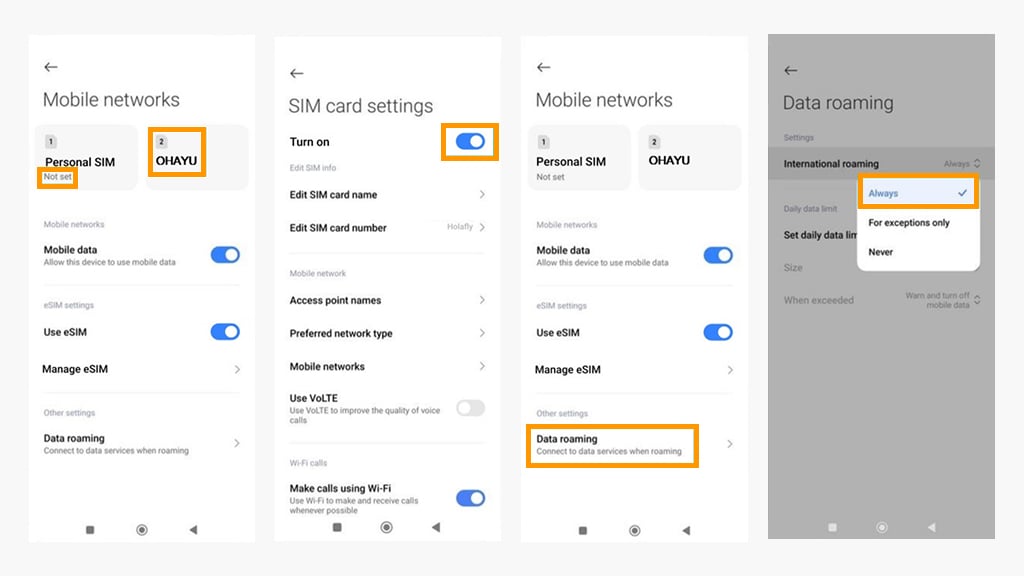
How to choose Xiaomi eSIM network
It gives you way more freedom. Instead of being stuck with one carrier, you can manually choose from networks allowed by your SIM or eSIM plan. In some places, it can help you switch to the network with better coverage or choose local carriers when you travel.
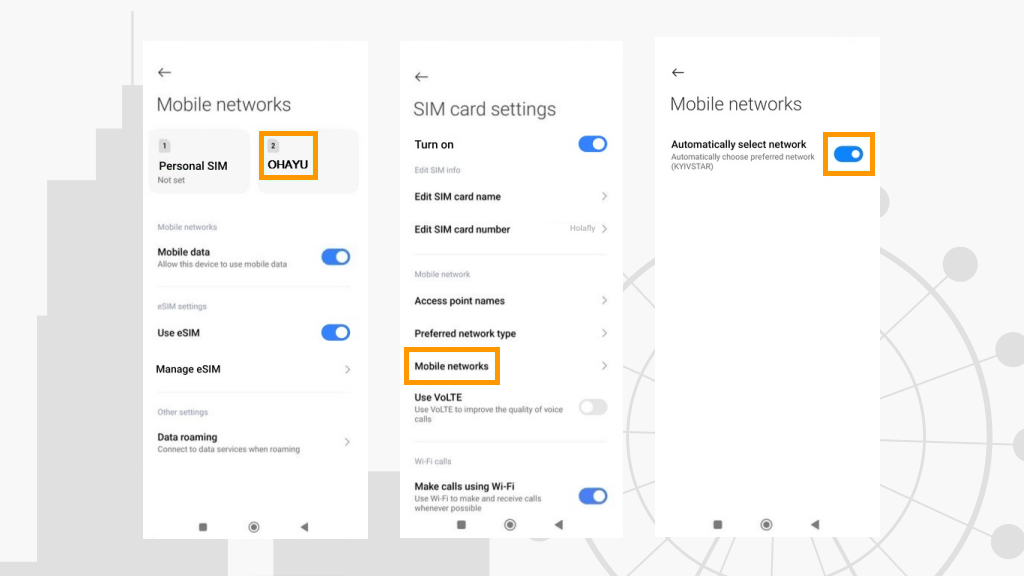
- Go to your eSIM > “Mobile networks.”
- Disable the “Automatically select network” setting.
- Then click “Next” > OK > OK.
- After that, the system will start searching for available mobile networks.
- Select a carrier.
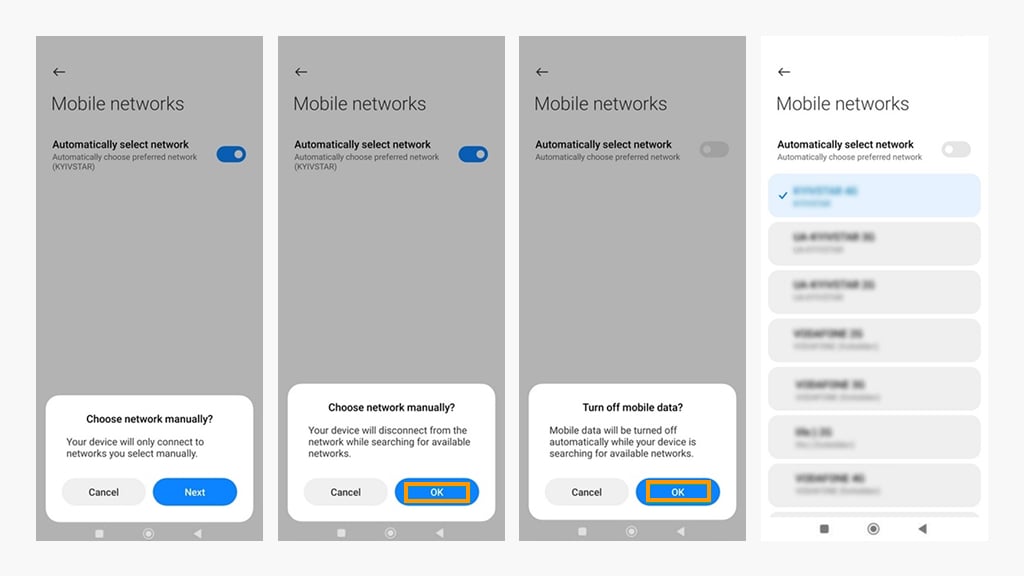
Can I convert a physical SIM to an eSIM?
This feature exists on iPhones, not Xiaomi devices. Apple allows users to convert a physical SIM to an embedded one directly in settings. Xiaomi phones don’t have this feature in their MIUI software. So, no in-device “conversion” exists.
Is the Xiaomi 14 Ultra eSIM-compatible?
No, the 14 Ultra is not built with an embedded SIM. It has Nano-SIM + Nano-SIM support.
Does Xiaomi Redmi Note 10s have eSIM?
No, the Redmi Note 10s doesn’t support eSIM. It’s Nano-SIM + Nano-SIM.
What popular Xiaomi devices do NOT support eSIM?
Indeed, not all popular models work with this technology. Here’s the list of the latest incompatible devices:
- Redmi Note 14/14 Pro 4G
- Poco X7 Pro
- Redmi Turbo 4
- Poco M7 Pro 5G
- Poco C75 5G
- Redmi K80/K80 Pro
- Pad 7/Pad 7 Pro
- Poco C75
- Redmi A3x/A3 Pro/A4
- Redmi Watch 5 Lite/5 Active
- Redmi 14R/14C/14C 5G
- Poco M6 4G/M6 Plus
- Redmi Pad SE 8.7
- Mix Flip
- Redmi K70 Ultra
- Mix Fold 4
- Redmi 13/13 5G
- 14 Civi
- Redmi Pad Pro 5G
- Poco F6/F6 Pro
- Poco Pad
- Redmi Note 13R
In which countries can I use my Xiaomi eSIM?
Ohayu eSIM has mobile data plans for 170+ countries and a Global eSIM that covers 120+ destinations and automatically switches networks when you cross borders. You can subscribe or pay per gigabyte. Check the web country store or download the app to get familiar with all the plans.
Troubleshooting common issues
Most issues are easy to fix. Follow these steps, and you’ll be back online in no time.
QR code won’t scan
First off, check your camera. Is it clean? Working okay? Now, try scanning the QR code in bright light and on a flat surface. If still no luck – try entering the details manually.
Activation errors
Make sure you’re connected to Wi-Fi or mobile data. If it’s still not working, restart your phone. Sometimes, that’s all it takes. As a last resort, double-check with your carrier to see if the eSIM is actually active.
No signal after activation
Go into your settings and make sure the eSIM is set as the active network. If that doesn’t work, try resetting your network settings. A quick reset often does the trick.
Have questions?
If you are still confused about your Xiaomi eSIM, please don’t hesitate to contact the Ohayu support team using Live Chat or email us at support@ohayu.com – we are here to help 24/7. You’ll also find more helpful answers on our FAQ page.