
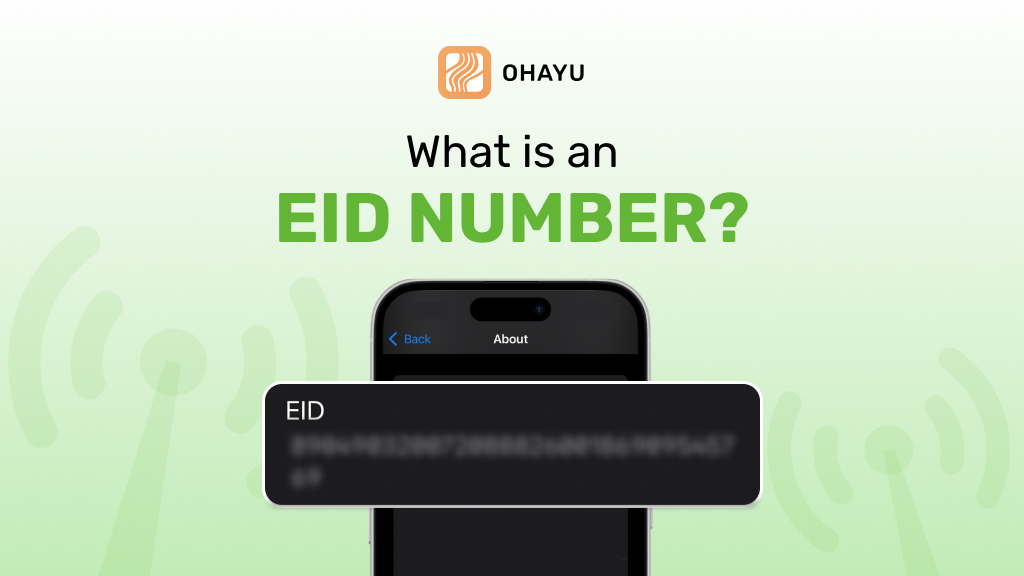
EID number (Embedded Identity Document) is a unique 32-digit code that is embedded in the device hardware when it is manufactured to identify the eSIM installed in it. It plays a crucial role in the operation, security, and management of phones, tablets, smartwatches, etc.
Let’s take a look at the technical intricacies of the EID number, its difference from other identifiers, such as IMEI, and why it is indispensable for modern mobile communication.
Understanding the EID number
EID stands for the globally unique identifier of an eSIM. Unlike the conventional SIM card, which can be mechanically transferred between devices, an eSIM is soldered into the motherboard. Thus, its identifier is inherently and inextricably linked with the hardware.
From a technical standpoint, the EID number works similarly to IMEI (International Mobile Equipment Identity), but applications are not similar. While IMEI identifies the cell phone, EID refers to the SIM component inserted in it. This distinction becomes relevant since this forms a foundation for operational security and management arrangements. It allows mobile network profiles to be provisioned remotely and activated without physical change of the SIM card.
How to find your phone EID and IMEI for eSIM
It is not exactly rocket science to find out your phone’s EID and IMEI numbers, although it slightly differs depending on the operating system of your device. Herein are the detailed ways of getting these numbers on iOS and Android.
On iOS
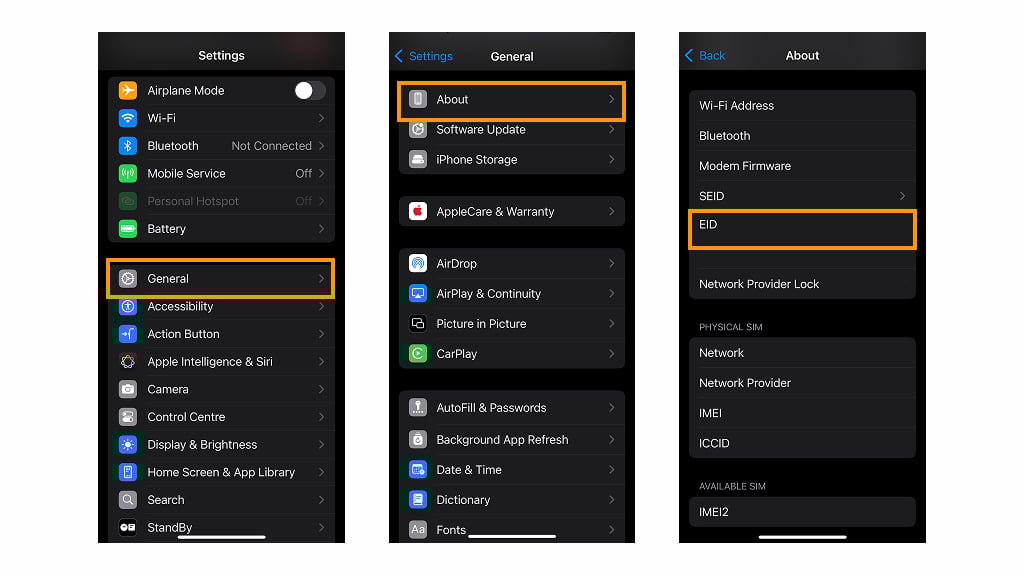
- Settings: Launch the Settings app on your iPhone.
- General: Scroll down and then tap on “General”.
- About: Tap “About” in the “General” section. You will be taken to a comprehensive list of specifications about your device.
- Identify the EID: Just scroll down the information to where you see the “EID” field. This is just an embedded identity document for your device that will be used exclusively for the eSIM.
- Find the IMEI: In the same menu, you’ll also find “IMEI”. IMEI identifies your physical device, and this is crucial at the time of carrier activation or when some hardware-related problem is to be sorted out.
On Android
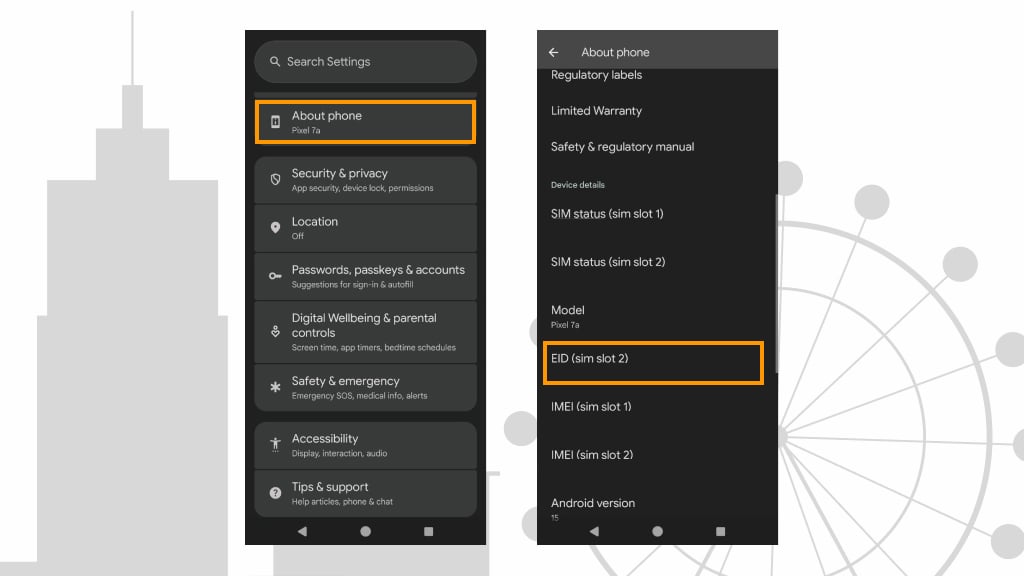
- Open the Settings App: Start by opening the “Settings” on your Android mobile.
- About Phone: Finally, scroll to “About Phone” or “About Device,” depending on your version of Android.
- Tap on Status or Hardware Information: On some smartphones, you have to tap on “Status”, “SIM Status”, or “Hardware Information” to get identifiers.
- EID: Look for any heading that spells “EID” or even “Embedded SIM Identifier.” or, on other models, these could be simply headed as “eSIM” or “SIM details.”
- Find the IMEI: Similarly, you can find an IMEI number inside the “Status” section. On other phones, you will need to click “IMEI Information” before you see the full number.
Alternative methods
Dialer code
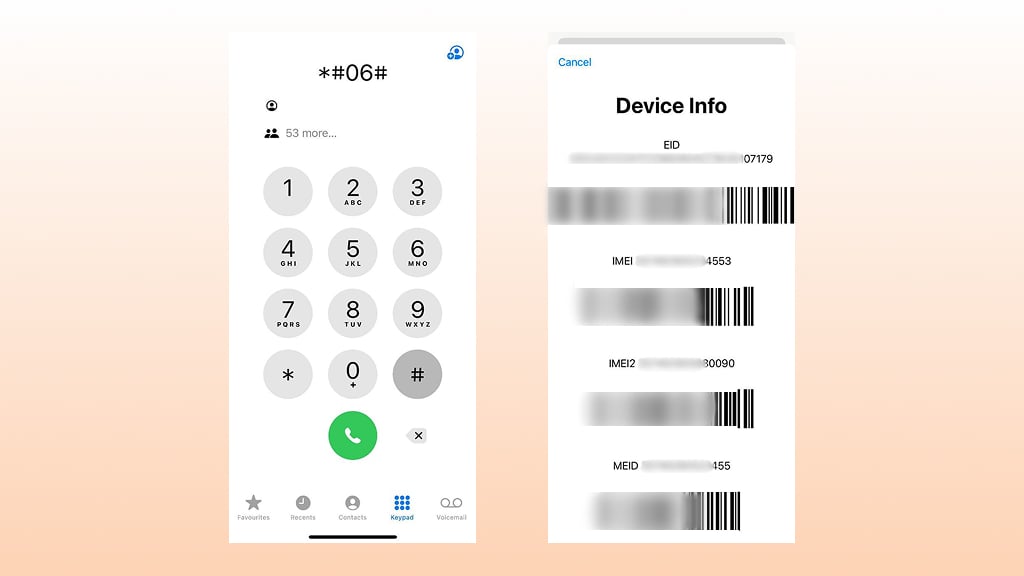
Many gadgets have a dialer code that will bring up information on the device. In many smartphones, for instance, you would dial *#06#.
Manufacturer’s application
Most new smartphones have proprietary support or diagnostic applications installed by the manufacturer of the phone itself. Many of them offer detailed hardware information, both EID and IMEI number included.
Carrier support
In case you cannot find such identifiers through the settings of your device, then reaching your carrier support will also help, since they usually have tools to at least retrieve or check these numbers.
How to check eSIM compatibility
Before making a switch to an eSIM, you need to ensure that the device supports the technology. This way, it helps avoid any activation problems and paves the way for your phone into a more flexible mobile network solution. Follow these steps:
Verify specifications
- Look up the manufacturer’s documentation or website.
- Look for keywords like “eSIM support,” “embedded SIM,” or dual SIM.
- Make sure that your gadget has an embedded SIM chip.
Software requirements
- Ensure that your operating system has eSIM capabilities.
- Upgrade to the latest version of the OS that the manufacturer has recommended to use advanced features.
Check carrier support
- Check their website for compatible devices.
- Customer support will also be able to confirm regional or plan-specific limitations.
- If the operator offers an app, then one can check whether their device is eligible for an eSIM.
Use diagnostic tools
- Built-in diagnostic apps or settings may confirm whether the eSIM is supported.
- You can use any other trusted third-party tool if more detailed verification is needed.
eSIM activation testing
- Obtain the eSIM activation code or QR code from your provider.
- Move along the on-screen instructions to activate your profile.
- After activation, it should connect to the network successfully.
Checking eSIM compatibility on Android
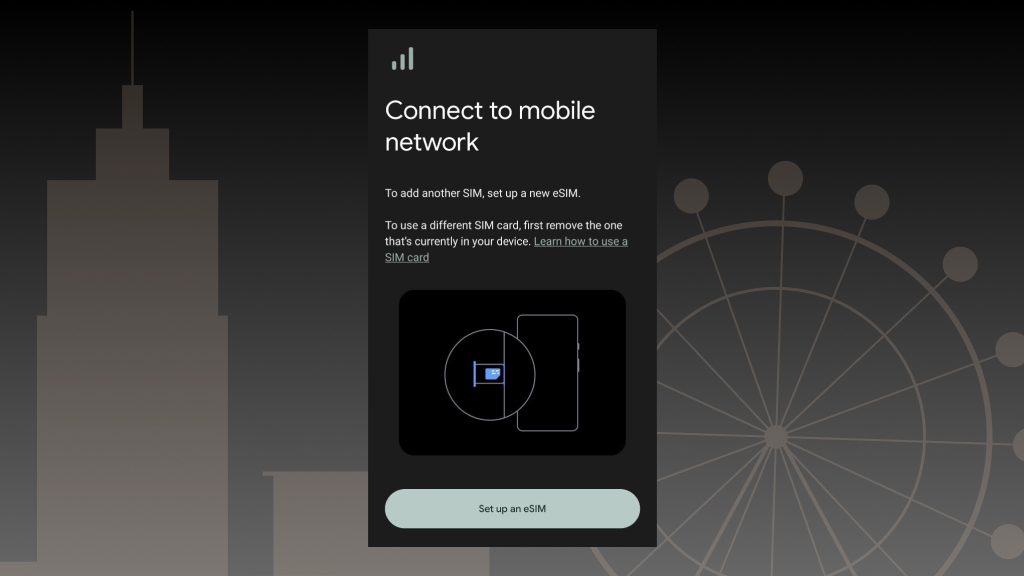
- Open Settings and go to About phone or Connections (varies by manufacturer).
- Look for an option like SIM status or eSIM & SIM cards.
- If eSIM is supported, you’ll see an option to add a mobile plan or scan a QR code.
- You can also dial *#06# to check for an EID number
Checking eSIM compatibility on iOS iPhone
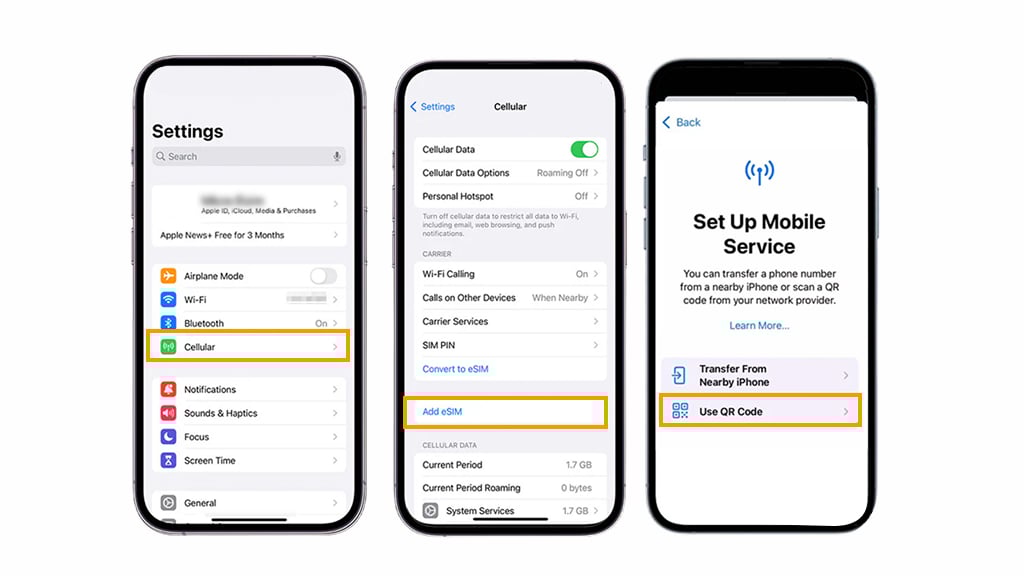
- Open Settings and navigate to General > About.
- Scroll down to find Available SIM (or Digital SIM).
- If your iPhone supports eSIM, an EID (Embedded Identity Document) number will be displayed.
- Alternatively, go to Settings > Cellular (or Mobile Data) and check for an Add eSIM option.
Security features of EID
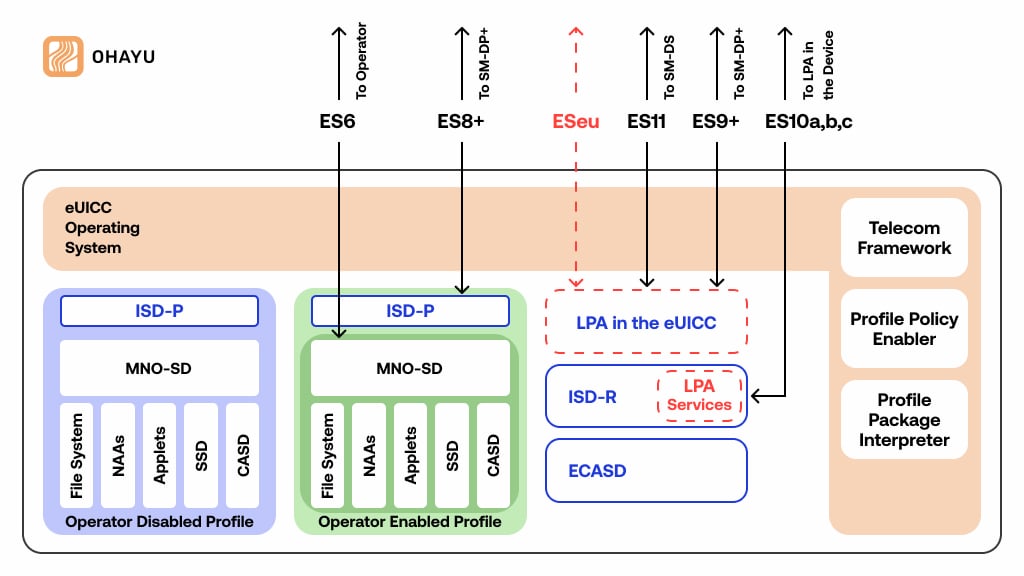
Protection around the EID number is primarily set up to be strong due to cryptographic protocols, integrated by an element that forms an advanced backbone with the eSIM. Purely from a technical perspective, this EID provided a non-tamperable identifier within the core of all remote-provisioning or authentication procedures. It has a series of security layers baked into its design: hardware-based encryption, verification of digital signatures, and safety boot mechanisms that ensure the integrity of both eSIM and the overall device.
Cryptographic integrity and secure provisioning
Basically, it is an integration of the public key infrastructure (PKI). During the process of eSIM activation, EID cooperates with the cryptographic keys in order to create a secure channel between the device and the remote management server of the operator. It generally includes:
- Every eSIM profile is digitally signed using asymmetric cryptography. Verification of this signature at the carrier’s server is performed with the corresponding public key, thus ensuring only authorized profiles are active.
- Protocols, such as advanced TLS/SSL, are used to encrypt the data exchanged during the eSIM provisioning process. It keeps eavesdropping and man-in-the-middle attacks at bay, securing the EID and sensitive user data sent during activation.
EID number secure element integration
Modern smartphones contain a dedicated secure element – a tamper-resistant hardware module designed to store sensitive information securely, such as an EID number. The element is separated from the main operating system to reduce the possibility of any type of software-based attack. Some key factors:
- Hardware root of trust
The hardware-based root of trust is provided by the element, which gives authenticity to the eSIM and all its associated profiles on each boot. In this case, the action of tampering is immediately detected, and the device can be locked down from unauthorized access.
- Mutual authentication
The safety element enables mutual authentication between the device and network infrastructure. This means two-way verification wherein not only the EID of the device but also the credentials of the carrier are authenticated to avoid any fraudulent activations.
- Secure storage of cryptographic keys
The secure element will store cryptographic keys used in encrypting communications and verifying digital signatures. It is kept in isolation in a way that, even when the main operating system is compromised, these keys can neither be extracted nor misused.
EID number advanced security protocols and compliance
The EID reliability bases on a very strict technical framework that meets harsh international standards and regulatory requirements. To this end, GSMA enforces rigorous guidelines in all eSIM implementations. Important protocols and operational standards include:
- GSMA remote SIM provisioning (RSP) specification
The specification describes the process of eSIM profile remote provisioning in a secure manner: all data exchanges involving the EID are encrypted, authenticated, and tamper-evident.
- FIPS 140-2/3 and common criteria compliance
Most implementations of eSIM are designed to achieve Federal Information Processing Standards(FIPS) and common criteria, acknowledged as the international benchmark standards for cryptographic security. This is assurance that at least the inside hardware and software components handling the EID match the industrial standards or even do better.
- Firmware and software updates:
Firmware and software updates are necessary continuously to enhance the protection. Such updates patch newly discovered vulnerabilities and integrate enhanced cryptographic algorithms that may be developed to maintain the strength of the EID framework over time.
Conclusion
eSIM technology is transforming mobile connectivity, eliminating the need for physical SIM cards and offering greater flexibility. However, ensuring compatibility is crucial before making the switch. Checking for an EID number, verifying support in your device settings, and confirming carrier compatibility are essential steps to avoid activation issues.
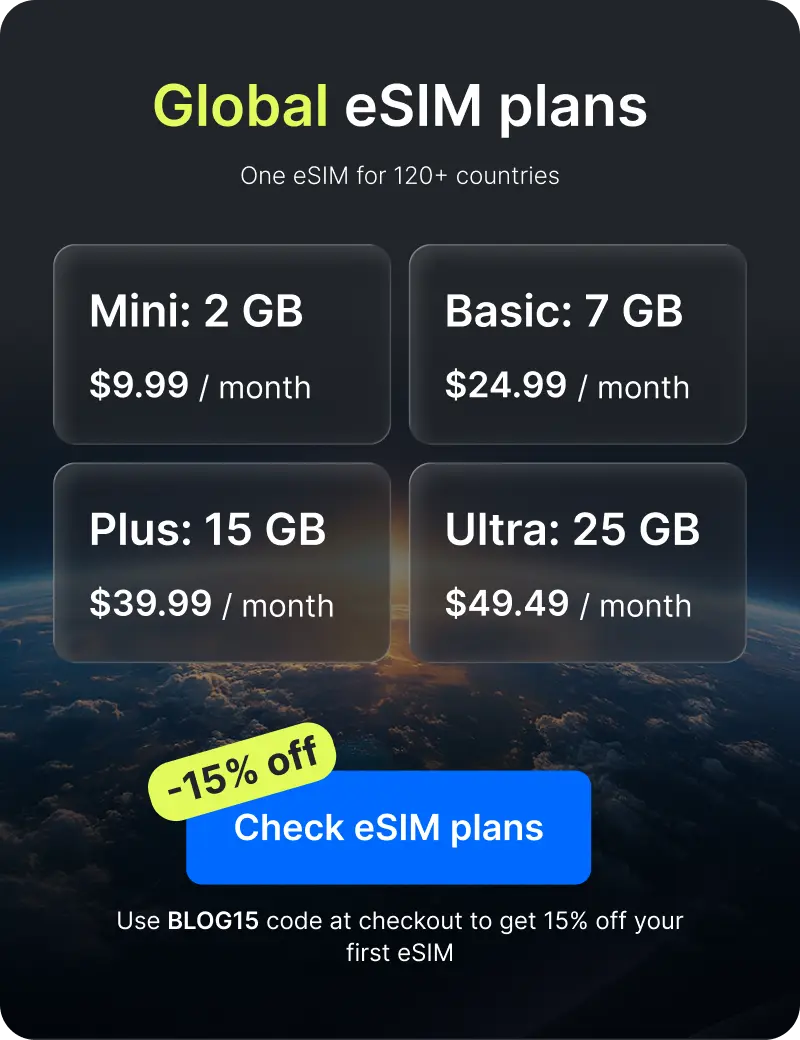
With more users adopting eSIM, reliable providers simplify the process. Services like Ohayu offer a seamless activation experience, making it easier to manage digital profiles without hassle. It has travel plans for 170+ countries and a Global eSIM that can connect you to local operators in 120+ countries and automatically switches networks when you cross borders.
By understanding how to find your EID and IMEI, and choosing a trusted provider, you can fully embrace the convenience of embedded SIM technology. Whether for international travel, dual-SIM functionality, or simply a more modern mobile experience, eSIM ensures a smoother and more efficient way to stay connected.