
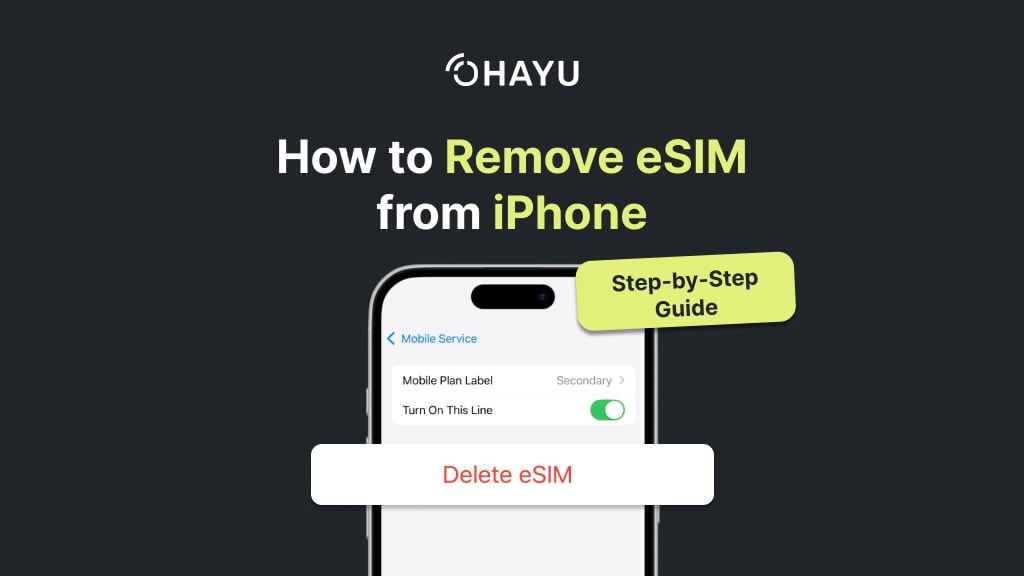
Modern smartphone settings allow tweaking a wide range of options, including deleting the digital SIM. It’s easy and quick to do so. To remove eSIM from your iPhone, go to Settings > open Cellular > click on the eSIM you want to remove > press Delete eSIM > confirm twice. As you can see, it takes just a few clicks. However, before you press ‘Delete’, you should find out what exactly happens to your data afterward.
In this article, you’ll find step-by-step instructions on how to remove eSIM from the iPhone, tips on things to do before and after, and solutions to the most common challenges.
Briefly on eSIM
An eSIM is a digital version of a physical SIM card. You can connect a mobile provider tariff plan to it just like a regular SIM. The difference is that it is built into your device, and you can’t hold it in your hands. Today, many iOS users have already come to appreciate its convenience. On the iPhone, it’s easy to activate and set it up. You can store up to 8 eSIMs on your iOS device and switch between them, activating one or two at the same time. It is very convenient for work, personal life, and travel.
Reasons to remove eSIM from iPhone
Removing the embedded SIM card does not mean physical interference with the device. It simply erases the mobile operator’s profile from the device’s memory. The built-in eSIM chip remains in place and may be used to install a new digital profile in the future.
Let’s look at the most common situations that require deleting a virtual SIM.
Selling the phone
When you intend to sell or trade in your smartphone, it is important to delete all active eSIM profiles on the old device. This prioritizes the security of your data: the new owner won’t access your calls and texts. Don’t forget to back up your iCloud and reset to default settings to clear all personal information.
Switching carriers
It is a logical step to take when you’ve found a more favorable tariff or a network with better coverage in your area. By the way, the MNP (mobile number portability) service is relevant today: even if you change operators, you retain your number.
Connectivity issues
Poor Internet connection and errors when sending SMS or making calls are frequent signs of a malfunctioning digital profile on your iOS device. To fix them, you should delete eSIM and then reactivate it using a QR code from your provider.
Switching to a physical SIM card
Despite its growing popularity, eSIM doesn’t fit every device yet. If you trade in your iPhone for a device without eSIM support, you should go back to using a regular SIM card.
What to do before you remove eSIM from iPhone
The first thing you should know is that deleting a virtual SIM does not cancel your agreement with the service provider. It continues to charge tariff fees even after deleting the profile from the smartphone. Therefore, consider the initial steps in order to do it correctly and avoid losing the connection.
Contact the operator for details
Correct removal often depends on your provider’s requirements. Check the information carefully and, if necessary, cancel the service officially.
Join an alternative network
Remember, if you delete the only active network on your phone, you lose access to network services instantly. Please connect to the Wi-Fi or another carrier’s mobile network on your device to download a new virtual card via the Internet.
Ask for new data to reactivate
Will the current virtual card be of use to you in the future? Ask your provider in advance for the QR code for reactivation (if you have not saved it before).
Discover dual SIM device peculiarities
Starting with the XS and XR, modern models support two SIM cards: a physical SIM and a virtual one, or two virtual ones. It is called dual SIM. It is convenient to separate personal and workspace, have a separate mobile card for traveling, etc.
For example:
- The physical card from your local operator.
- eSIM from Ohayu to travel abroad.
Their owners are less likely to think about removing them, as they always have extra space. The advantage is the ability to switch profiles (make sure the green indicator on your screen is active).
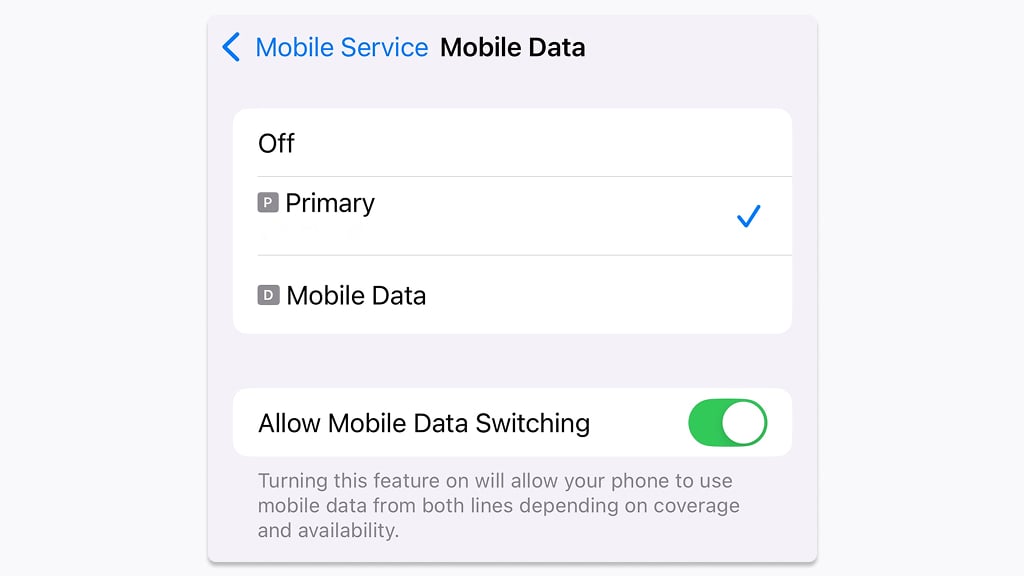
This way, the gadget utilises both mobile data, depending on the coverage. Besides, you are free to turn on/ off the lines as much as you need. Choose which one to use for calling and texting.
When you still need to free up space, follow the instructions below.
Step-by-step tutorial: how to remove eSIM from iPhone
Please note that this guide is valid for iOS 18.5 (screenshots from iPhone 14). Depending on the model, the interface may differ slightly. However, the steps involved are all the same.
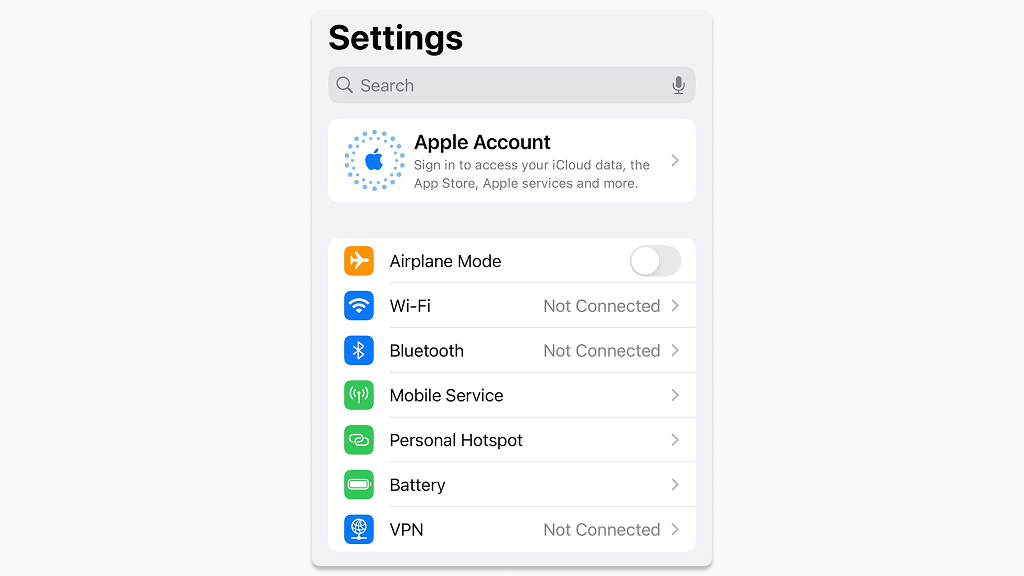
- Step 1. Open ‘Settings’ on the main screen. Look for‘Mobile Service’ in the middle of the screen. In the USA, it is called ‘Cellular’, while ‘Mobile Data’ is also common for other localizations.
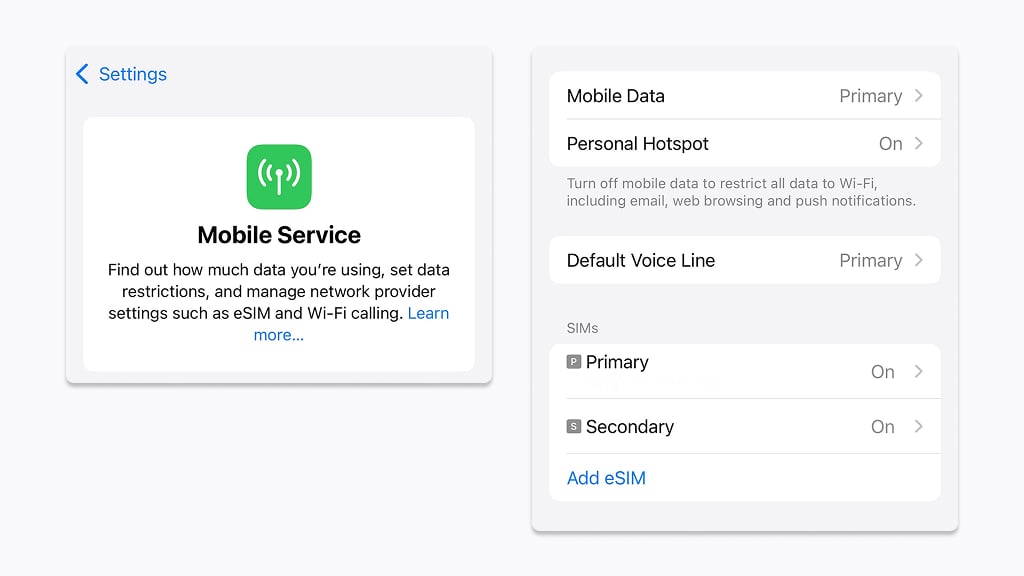
- Step 2. There you’ll see up-to-date information about profiles and numbers. In the eSIMs section below, select the profile you intend to delete. Click on it to see its settings.
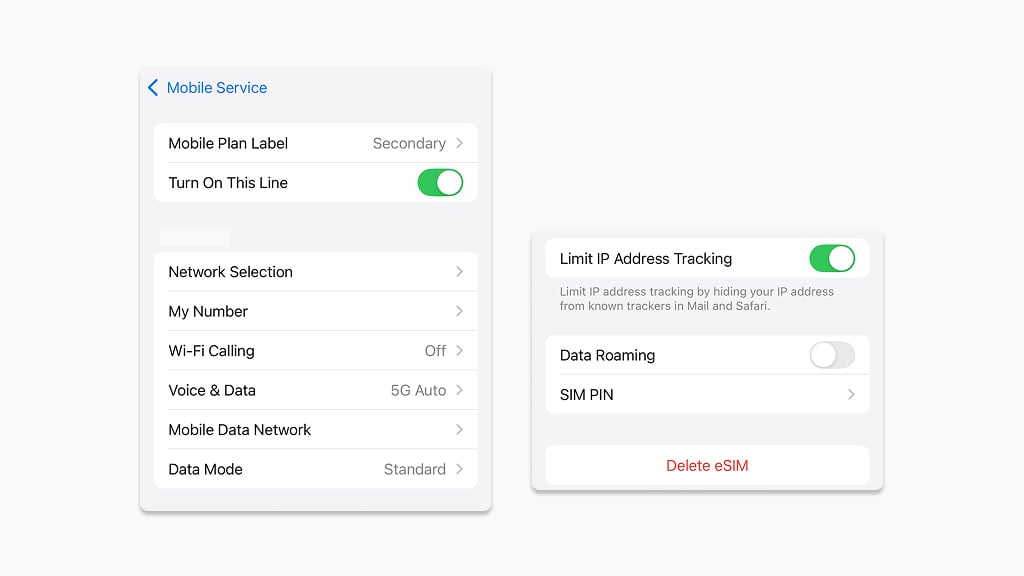
- Step 3. At the bottom of the page, click ‘Delete eSIM’.
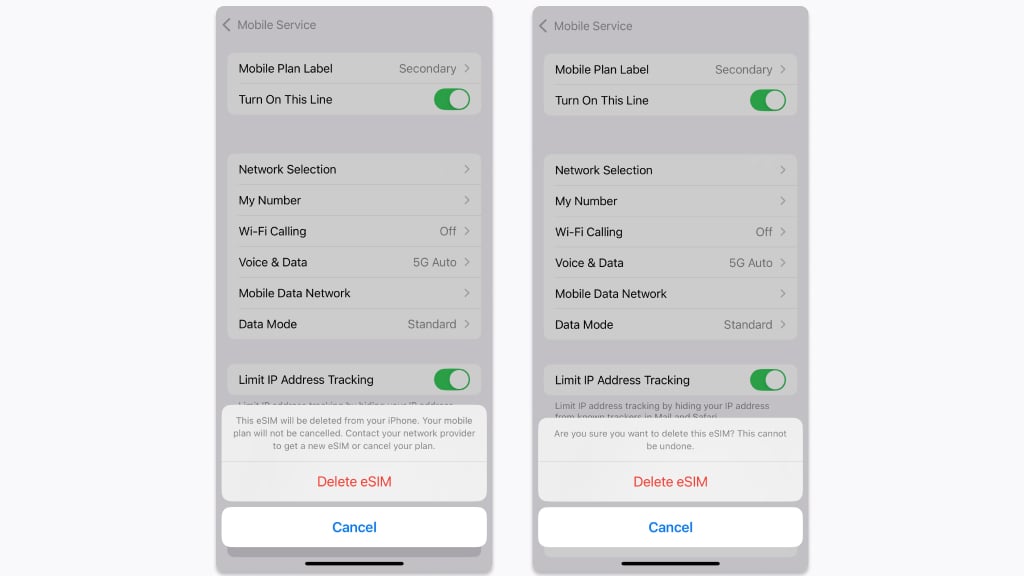
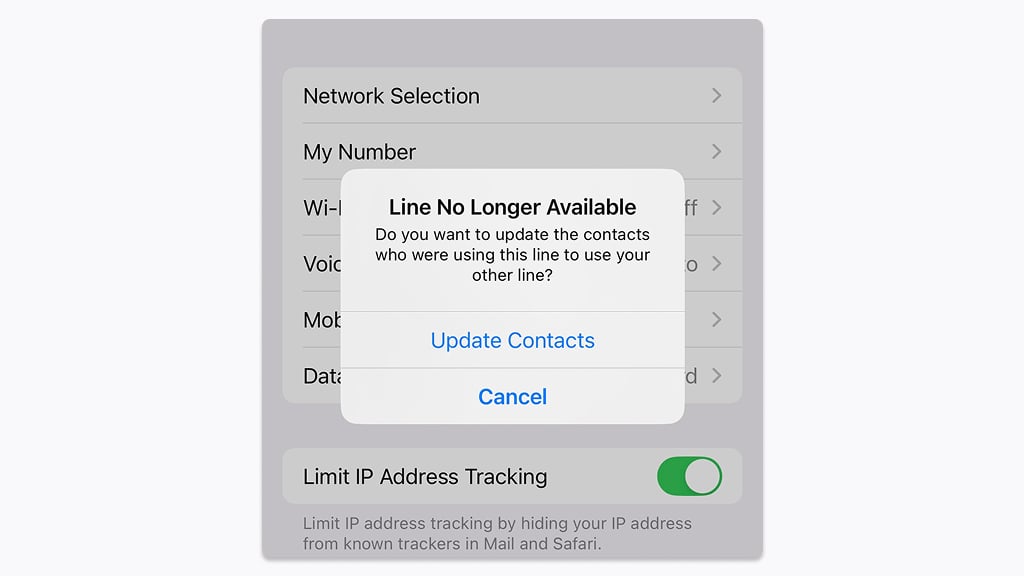
- Step 4. In an add-on window, you’ll read a warning that your plan has not been canceled. Confirm your intentions twice.
- Step 5. Once deleted, this eSIM will no longer provide mobile data or connectivity. Now, if necessary, update your contacts for anyone who used that number. When you call them in the future, they will see your other number on their screens. If you were using it for internet access (e.g., while traveling), be sure to switch to another data source (e.g., Wi-Fi or another SIM).
Manual removal
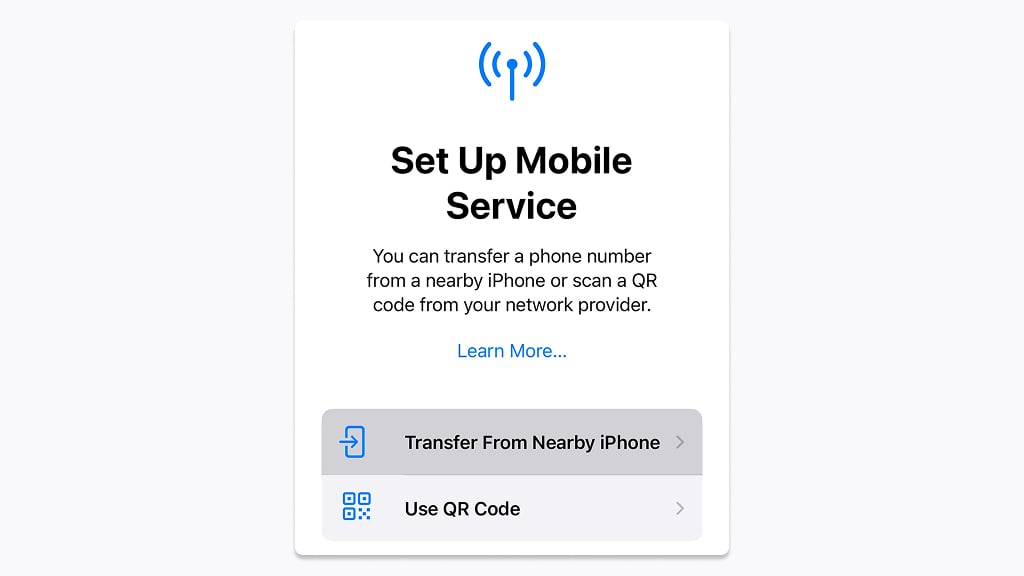
Starting with iOS 16, all newer versions support data portability. You can transfer a digital SIM card to the new device via the ‘Add eSIM’ option in the ‘Settings’. Press the ‘Transfer From Nearby iPhone’. After that, it becomes disabled on the old device.
Troubleshooting: issues and solutions
Since not all users are fully aware of what a built-in SIM is and how it works, many doubts arise. Below are the most common issues users face when they remove eSIM from their iPhone and the ways to solve them.
User fears of deleting personal data
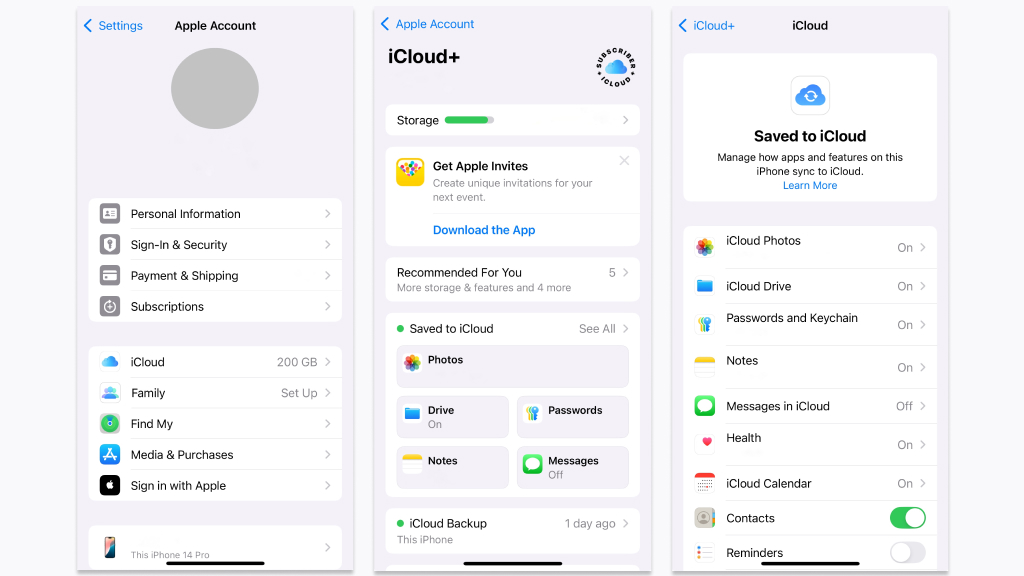
Deleting an embedded SIM from your smartphone does not affect your data, such as photos, videos, and applications. The digital card retains information about your phone number, security keys (IMSI: International Mobile Subscriber Identity), network settings (APN: Access Point Name), and tariff. When you delete a profile, your number is still active. As for your contacts, they usually sync with iCloud. To find out if your personal iCloud keeps your contacts, follow the steps:
Settings > Your name > iCloud > Saved to iCloud > Contacts (with green switch)
Failures and errors
If the process hangs and slows down, warnings that removal is impossible appear on the screen, you should find out what the problem is.
- Restart your gadget to begin with. It often fixes minor software glitches.
- Check for the latest iOS update: Settings > General > Software Update. If required, refresh to the latest version. Devices with regular updates tend to experience rare technical faults.
- As soon as you are sure there are no missteps on your part, contact your provider. Some may strictly monitor the installation/removal of virtual SIM cards, so it is impossible to proceed without their permission.
And finally, if all attempts are futile, contact Apple support. Describe the situation, and they will give feedback via chat or email.
Summing it up
When it comes to changing providers and gadgets or troubleshooting connectivity issues, removing eSIM from the iPhone is a priority. To do it correctly via smartphone settings, you need to take care of key aspects in advance: alternative network access (Wi-Fi or another provider’s network), getting a new QR code, and coordinating the steps with your provider. The process is fast and simple, but sometimes emerging difficulties require the intervention of the operator or the developer’s service department.
If you need an eSIM for traveling after you’ve deleted your previous one, Ohayu has a great solution. Ohayu Global Plans can connect you to local networks in 120+ countries and offer eSIMs from $9.99 per month.

iOS eSIM FAQ
You should restore it with the QR code you received from the operator (if you have saved it). Alternatively, reapply to the operator.
No. Often, two devices work with different profiles but the same phone number. For example, a phone and an Apple Watch. Check with your operator to see if it supports this service.
Sure. When you are back home from a foreign country, your travel plan usually runs out, as it has a limited amount of data and an expiry date. Delete it to free up space. If you intend to revisit the country, just deactivate it.
Tourists value the convenience of activating without a physical card. When traveling a lot, they have several tariffs for different countries at the same time. Users switch them independently in the phone settings.
Yes, the interface and section names vary. Find out how to erase eSIM from your Android device and much more in Ohayu’s Knowledgebase.