
Access Point Name (APN) refers to a specific set of parameters that determines the path your mobile device uses to connect to the Internet through the operator’s network. An APN is essentially a type of “route” that channels data from your device to the correct carrier’s servers, including Internet traffic, messages, or other types of communication services.
It is actually one of the most crucial components of the cellular network, which smartphone and IoT device users don’t even realize. Without a well-configured APN, the Internet doesn’t work, you can’t send MMS, and voice calls rely on legacy technologies. We are going to learn about the APN structure and how to set it up under various scenarios in this article.
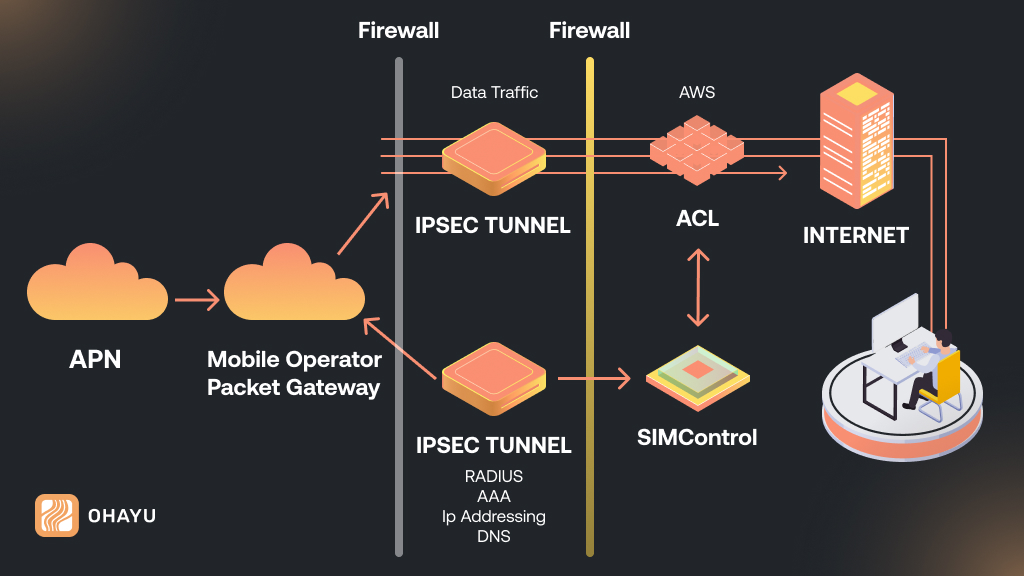
Understanding APN fundamentals – infographics
APN is a critical mobile parameter that acts as a bridge between your device and the operator’s Internet services. If you think of the mobile network as a complex system of roads, the APN is a navigational map that indicates which route your traffic should take: to a regular Internet gateway, MMS server, corporate VPN or other services. Without it working correctly, your device simply won’t understand where and how to connect, even if the SIM card is activated and there is a connection signal.
Basic APN functions
- Identification: Determines which gateway (GGSN, PGW) to connect to.
- Authorization: Verifies the access rights to the carrier’s services.
- Connection setup: Specifies the type of protocol used (IPv4/IPv6), QoS (Quality of Service), and security.
APN main components
APN name
This is the first name to refer to an individual access point on the operator’s network. It refers to the route of the connection. It may be “internet”, “wap” or a more detailed name assigned by the provider.
Username and password
Provider may require authentication to connect to the network. This includes the verification settings used for secure connection. Typically, these options will auto-populate from the SIM card settings, but in certain circumstances, you need to type them manually.
MMSC (multimedia messaging service center)
This parameter is responsible for routing MMS messages. It specifies the server address through which the multimedia data is transmitted. For MMS services to work correctly, one must correctly configure the MMSC settings.
Proxy and port
Sometimes an intermediate server (proxy) is used to access the Internet. Configuring the proxy and the corresponding port allows the operator to filter traffic, provide an additional level of security, or optimize data transmission.
Mobile country code and mobile network code
These codes both identify a nation and a given mobile network. MCC and MNC have a significant part to play in roaming and the automatic detection of the network with which the device is connected.
Authentication type
There are some networks that offer a selection of authentication methods, including PAP or CHAP. Selecting the appropriate method can enhance the security of the connection and block unauthorized use.
Optional parameters
There are also often additional options, for example, for IPv4 or IPv6, DNS server, or settings to optimize the quality of service.
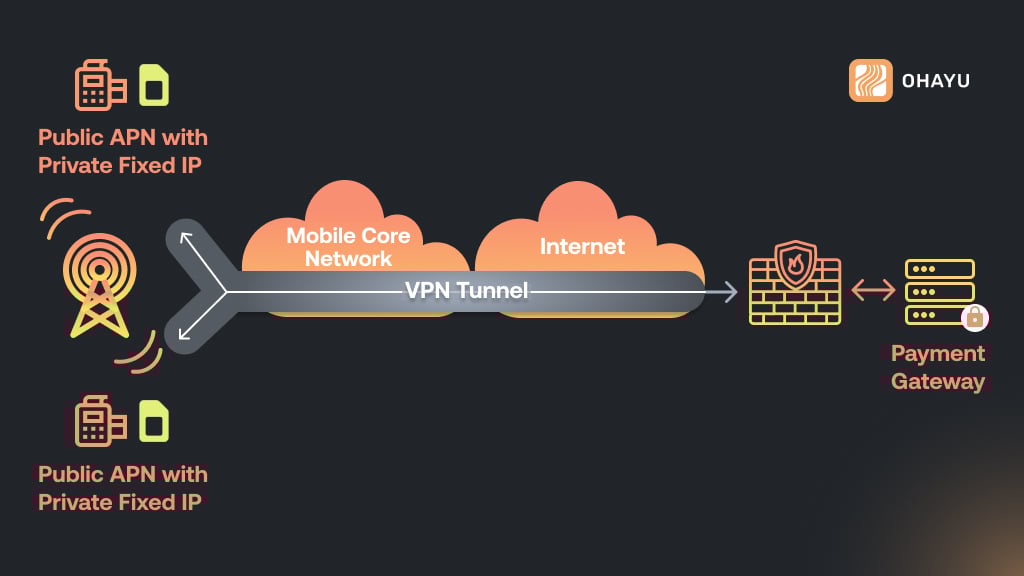
Technical process of APN operation – infographics
APN is such a “key” that enables your device to get “behind the scenes” of the mobile network. It’s the same as writing an email without any address – it will never reach its destination. In the same way, your smartphone or modem cannot communicate with the carrier’s servers without an APN. But how is everything done? Let’s step through the process.
Identification
Upon insertion of a SIM card, the device reads its parameters, i.e., MCC and MNC. It sends the information to the operator’s server for the purpose of deciding which network to use. In case the SIM card is roaming, the APN assists in choosing the local partner of the provider.
Gateway selection
The carrier directs traffic through a special gateway:
- GGSN (Gateway GPRS Support Node) in 3G
- PGW (Packet Data Network Gateway) in 4G/5G
- APN specifies which gateway to use. For instance, internet.abcabc.com routes the traffic to the default Internet gateway, and mms.nxnx.com routes the traffic to the MMS server.
Assigning an IP address
The gateway assigns an IP address to the device. There are possible scenarios here:
- Public IP – for direct access to the Internet (often used in IoT)
- Private IP – an address from the operator’s internal network (typical for smartphones)
In 5G, IPv6 is supported, which simplifies routing for millions of IoT devices
Authentication
The carrier verifies that the device is authorized to access services. For this purpose, it uses:
- Login/password – often standard (e.g., internet) or blank
- Authentication type – PAP or CHAP. If the data is incorrect, it disconnects
Activating services
The APN determines what services are enabled for:
- MMS, a proxy server is enabled (e.g., mmsproxy.abcoperatorbca.com:8080)
- VoLTE, a priority channel with zero delay, is enabled
- Corporate customers, traffic is routed through VPN
Case study: why the internet slows down after changing SIM-card?
If the device is configured to use an obsolete APN, the carrier will forward traffic to an old 3G gateway (GGSN), although the network may be 5G-capable. Entering the present APN manually reroutes to a new PGW/UPF, which offers better speed.
How to change APN: step-by-step instructions
Most often you need APN configuration when you change carriers, use an MVNO, or connect an IoT device. Here are the detailed steps:
Android
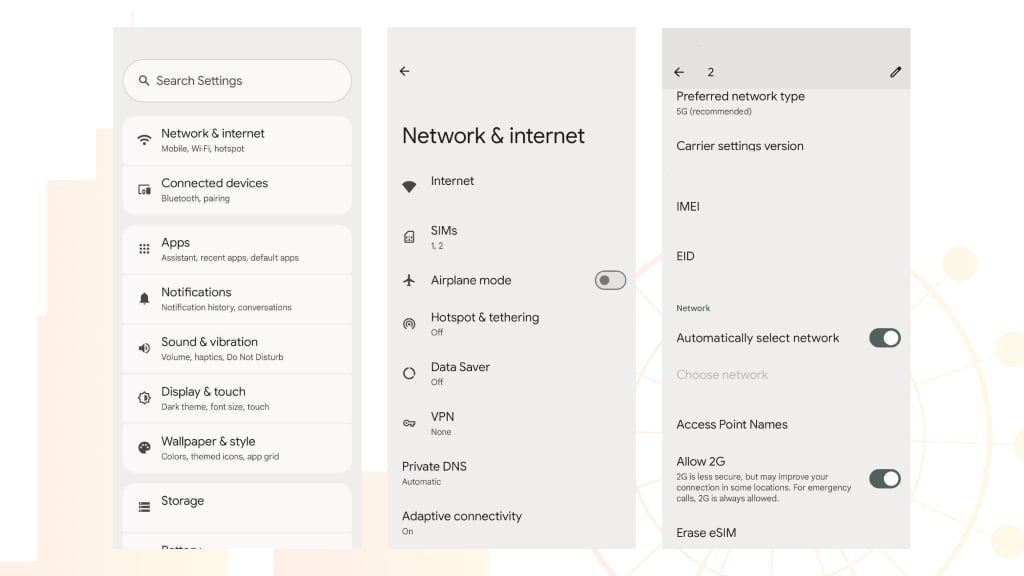
- Go to Settings – Internet – Mobile Network (in older versions: “Data Transfer”).
- Select Access Points (APN) – press “+” or Create new access point.
- Enter the parameters specified by the operator (usually on the official website under “Manual Internet Setup”).
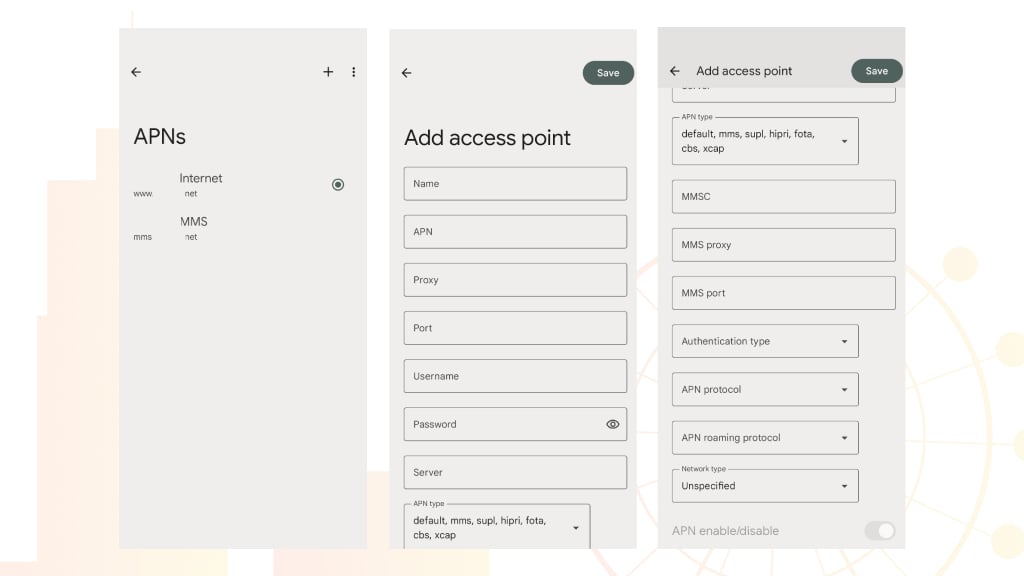
- Required fields: Name, APN, MCC, MNC
- For MMS add: MMSC, MMS Proxy, MMS Port
- Save the profile, select it in the list and reboot the device.
iOS
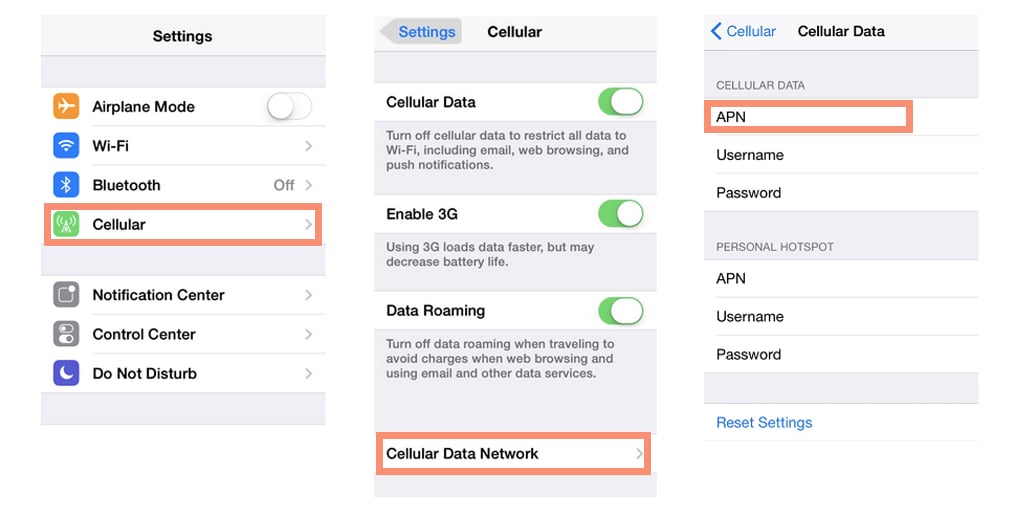
- To change APN on iPhone go to Settings – Cellular – Cellular data network.
2. In the APN section, enter data for Internet, MMS and, if necessary, for a personal hotspot.
3. If the settings are locked, then update via Settings – Basic – Software update.
APN issues and their solutions
Internet works, but websites won’t load
Cause: A mistake in the APN Type parameter. If the default only is entered, the device disallows services needing supl (Google geolocation) or dun (modem mode).
Solution: In the APN Type field, input “default,supl,dun,mms”.
No internet in roaming, despite having connection
Cause: The home operator’s APN doesn’t support roaming, or data roaming is disabled.
Solution:
- Enable Data Roaming in settings
- Create a copy of the APN and add a .roaming suffix to the name (e.g., internet.providerx.roaming).
Device connects only to 3G
Cause: The APN specifies an outdated type (e.g., only IPv4), while the provider uses IPv6 or hybrid mode.
Solution: In the Protocol Type field, select IPv4/IPv6, and in Network Mode, choose LTE/UMTS/GSM (for automatic selection).
APN conflict in dual SIM smartphones
Cause: Both SIM cards try to use the same APN, even though carriers have different parameters.
Solution: Create separate APN profiles for each SIM with a prefix in the name (e.g., XXX_Internet, XXX_MMS). Enable smart SIM switch in settings (if available).
Cannot save APN: fields are locked
Cause: Carrier firmware (especially on iOS and Huawei) blocks APN editing.
Solution:
- For iOS: Install a configuration profile from the operator’s website.
- For Android: Use a configuration app like APN Settings (requires developer permissions).
Technical nuances and possible problems
Incorrectly configured parameters can cause various problems:
- Lack of Internet connection
If the device fails to authenticate correctly or fails to obtain an IP address, the Internet connection may be completely unavailable.
- Problems with MMS messages
An incorrectly configured MMSC or missing proxy settings for MMS may result in multimedia messages not being sent or received.
- Slow data transfer speed
Configuration errors can cause unnecessary delays in routing traffic, which affects connection speed and stability.
Impact of operating system updates
When you upgrade the operating system or firmware, it erases the default APN settings. In that case, we recommend verifying if the settings meet your provider requirements and, if so, re-entering the required parameters appropriately. All operators publish updated guidelines on their own websites, therefore, you can effectively rule out potential failures.
Features of roaming and international travel
If you are traveling abroad, the device should automatically switch over to the local operator’s APN settings. Inappropriate MCC and MNC can also trigger roaming problems and extra tariffs. Therefore, we highly recommend that you be aware of your operator’s advice regarding the use of mobile data when you travel abroad.
Additional safety measures
For business clients and users needing higher protection, carriers provide special APN settings in combination with VPN or other encryption systems. This kind of solution makes it possible to grant a reliable connection and security for the data passed through against interception.
To sum up
APN is the unsung hero of mobile connectivity. It operates behind the scenes to enable your device to connect to the internet, as well as to specialized services. A subtle knowledge and correct setting of the APN spares you an endless number of connectivity problems. Whether troubleshooting a “no internet” error or optimizing your device for 5G, expertise in how APNs function puts you in the driver’s seat of your mobile experience. If you want to get rid of the hassle of connecting or are not proficient at it, then use quality services.
For example, Ohayu eSIM automatically configures your APN (Access Point Name) during the installation process in about 99% of cases. For most users, there is no need to manually enter the settings.