
Data roaming is the use of cellular data services on a mobile device beyond the range of the home area network. It is based on a network agreement between your home mobile operator and foreign operators, allowing you to connect to other networks while travelling internationally. While roaming, you keep your home number and SIM/eSIM profile for SMS, calls, and mobile internet, but the cost for services is usually much higher.
This guide explains how data roaming works, when to use it, and how to avoid extra charges. With the right settings and plan checks, it is easier to avoid mistakes.
Explanation of the data roaming concept
Data roaming is the process by which you connect to the Internet through the networks of other carriers when you are outside your home operator’s service area. It’s possible to use roaming to get the internet abroad for most modern mobile operators (check the diagram).
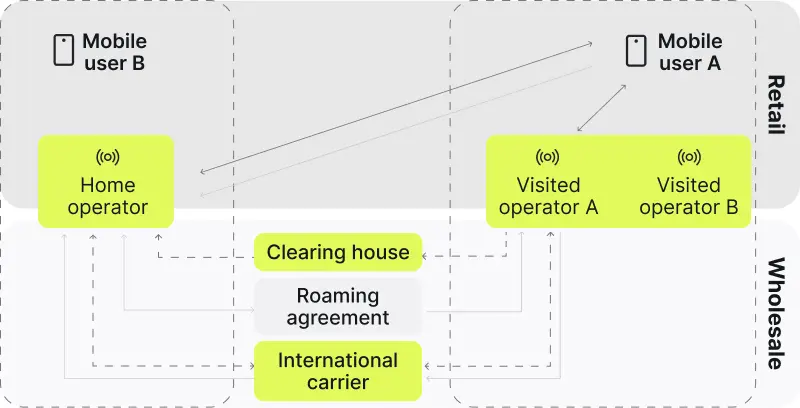
In practice, it means your phone uses another operator’s network when your own network is unavailable. While traveling, the smartphone connects to the carrier network where the provider has a roaming agreement. When your home network is unavailable, the device searches for other available networks and attempts to register on one of them.
It allows you to use the Internet, messengers, and other features just like at home. But the problem is that it comes at a much higher cost than usual. Unexpected charges are common if roaming is left on without checking the tariff. Therefore, we recommend that you turn on roaming only when necessary.
History of mobile roaming
Mobile roaming dates back to the 1980s. At that time, the development of the GSM standard began, which allowed phones to operate in different regions and countries using SIM cards. Technologies such as SS7 provided call routing and billing. Now roaming is worldwide and supports texts and data.
| Year(s) | What was done | Brief explanation |
| 1987 | GSM standard | GSM (Global System for Mobile Communications) allowed mobile phones to work across different networks. |
| 1990s | First roaming agreements | Telecom operators in Europe began creating agreements to let users connect to networks while traveling. |
| 1990s | SS7 protocol | SS7 provides seamless communication between networks regarding authentication and billing. |
| 2000s | Data roaming introduced | Roaming expanded to include data services alongside calls and texts. |
| 2000s–2010s | Global expansion | The technology has become available in most countries. |
| 2017 | EU “Roam like at home” policy | The European Union introduced rules to eliminate extra charges within its member states. |
| Present | 4G/5G | Faster networks now support high-speed roaming for modern services like streaming and IoT devices. |
How does data roaming work?
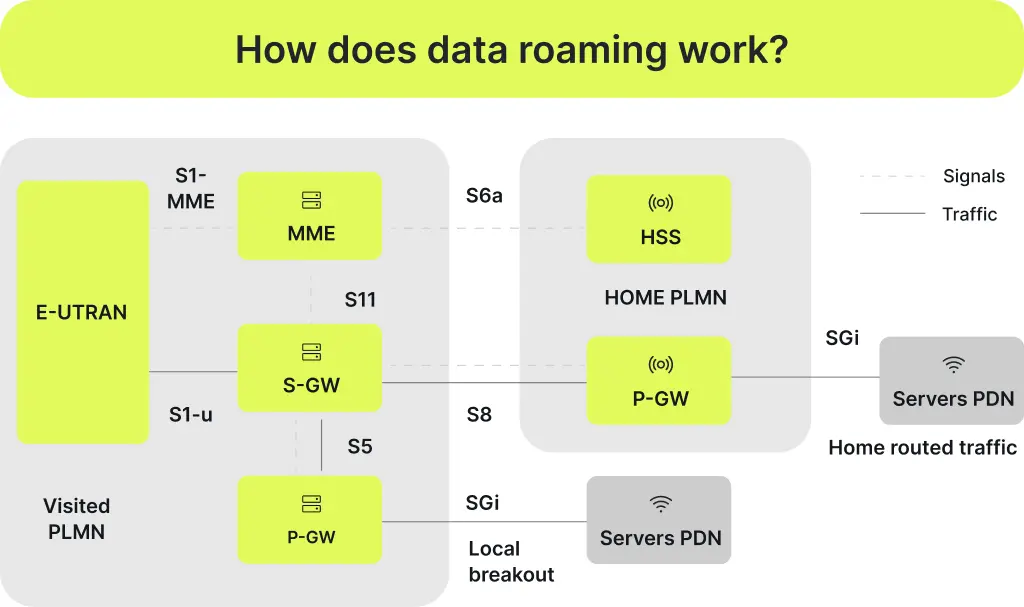
LTE roaming architecture
- E-UTRAN (Evolved Universal Terrestrial Radio Access Network)
- MME (Mobility Management Entity)
- S-GW (Serving Gateway)
- P-GW (Packet Gateway)
- HSS (Home Subscriber Server)
- PLMN (Public Land Mobile Network)
- Servers PDN (Packet Data Network Servers)
Network search
Outside the network coverage area, the device automatically searches for other available alternatives. Your SIM card contains a list of priority operators with roaming agreements.
Authentication and connection
The device transmits the IMSI (International Mobile Subscriber Identity) to the selected network. In LTE, the visited network exchanges subscriber and authentication data with the home network’s HSS (High-speed steel). Legacy networks may still involve HLR (Home Location Register) systems to verify service access rights.
Data routing
After successful verification, the process follows with the routing of the Internet traffic between the roaming network and the home operator via GTP (GPRS Tunneling Protocol). In 4G and 5G, a PGW (Packet Gateway) provides high data rates, performing the same functions.
Billing and accounting
The consumption rates are then recorded and transmitted to the home network via TAP (Transferred Account Procedure). It is required for subsequent billing.
Communication quality
4G or 5G availability is dependent upon the agreement between operators. Sometimes, the speed or type of connection could also be restricted.
When to use data roaming?
If you have to stay in touch regardless of geographical location, it’s worth using this feature. Here are a few examples:
| Roaming use case | Explanation |
| Business travel | The Internet is used for e-mail, video calls, or remote access to corporate systems. |
| Tourism | Maps, translators, and messengers guide one through a new place and keep one in touch with loved ones. |
| Emergencies | Сontact your family or call for help from any location. |
| Long-term travel | If you’re out of the country for a while, roaming may be enough to keep you connected to the local network. |
How to enable data roaming on iPhone or Android?
Android
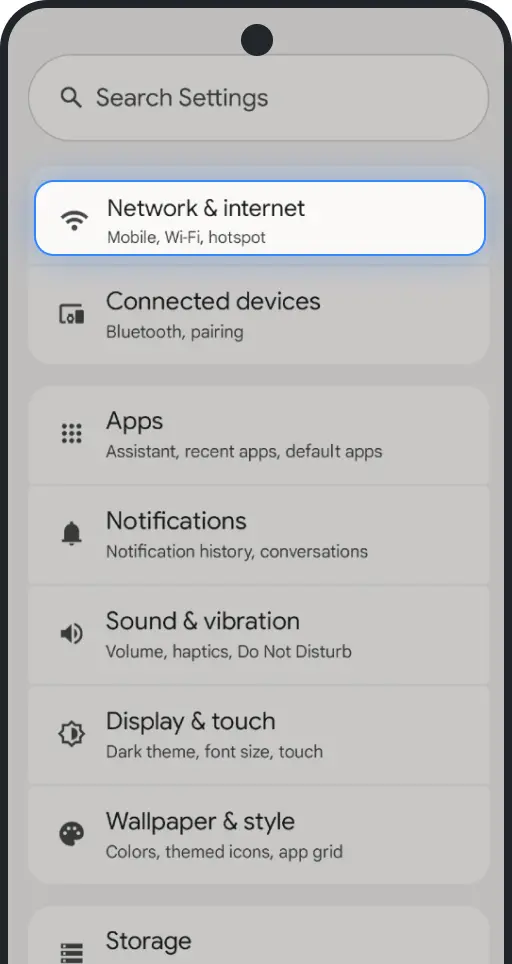
- Go to the Settings app on your Android device.
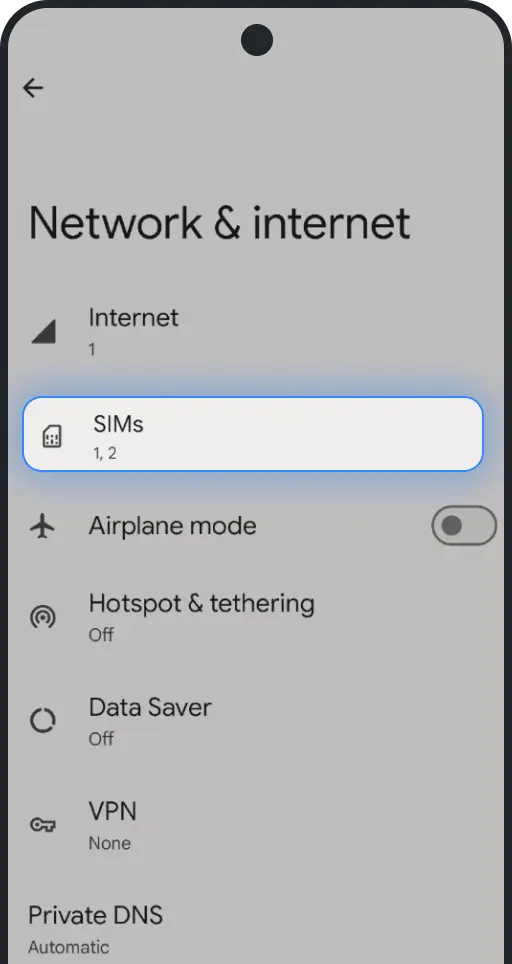
- Look for ‘Network & Internet‘, or a similar.
- Tap on ‘Cellular Networks,’ ‘SIMs,’ or a similar option.
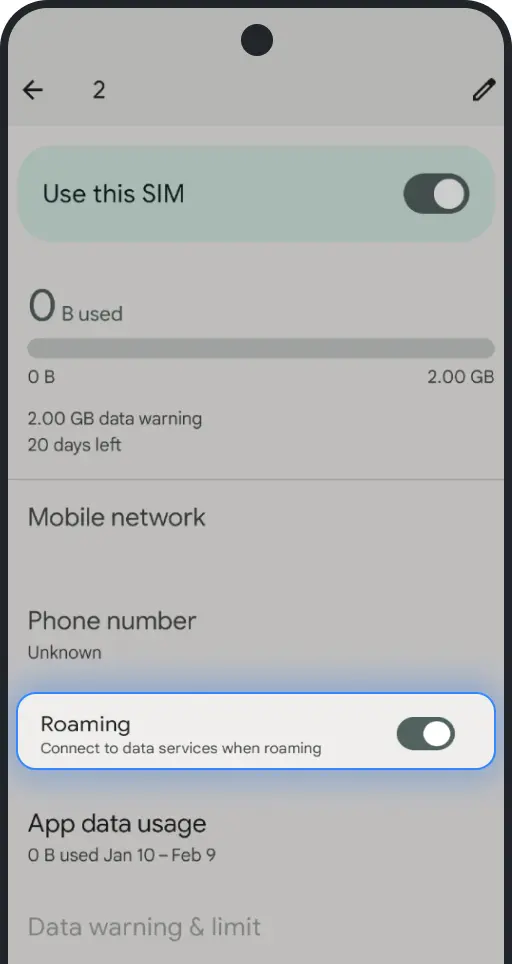
- Find the ‘Data Roaming‘ option. This might be a submenu or an option in a particular SIM card setting.
- Toggle the switch to ON to enable the function.
iOS
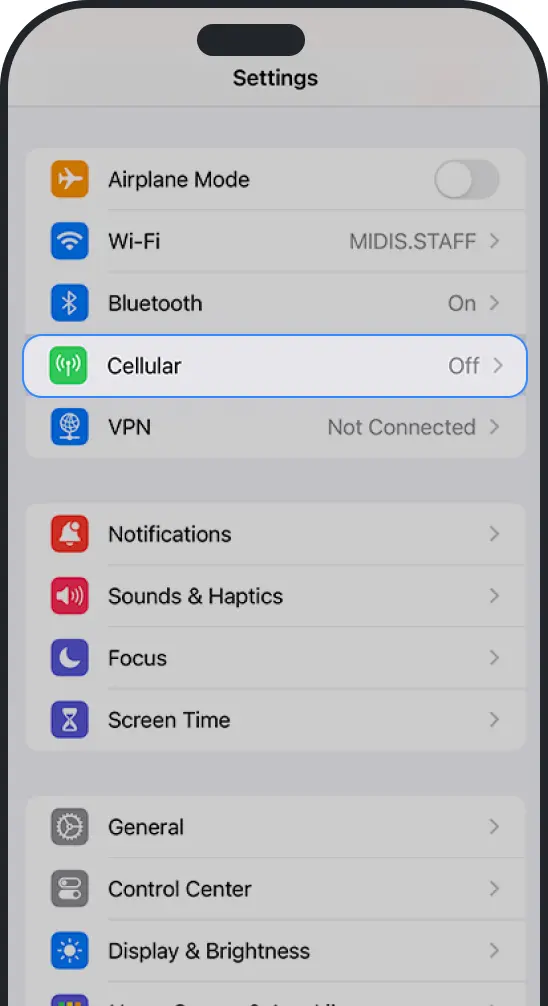
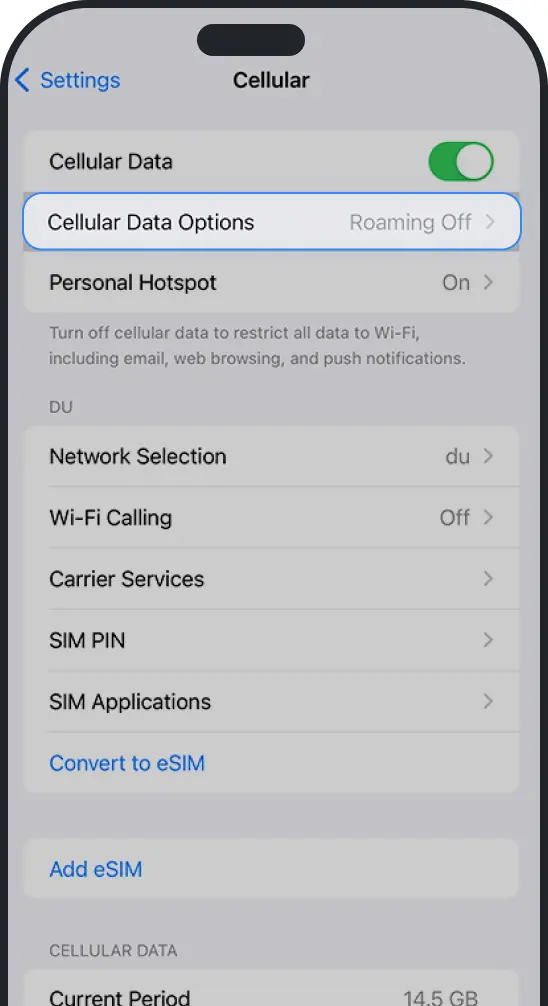
- Go to Settings on the iPhone.
- Tap on ‘Cellular‘ or ‘Mobile Data‘ depending on your region.
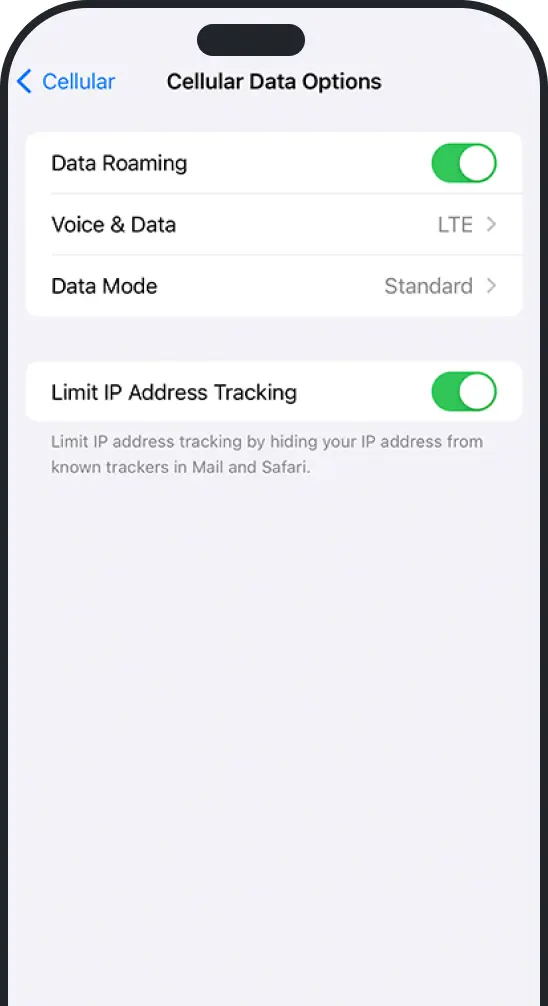
- Tap on ‘Cellular Data Options‘.
- Switch the ‘Data Roaming’ to ON.
Types of data roaming
There are different types of this function, and their application depends on the region and the nature of use. Knowledge of all the features is beneficial for selecting options for various situations.
Domestic
This standard type is used when the user is within their own country but goes out of the home operator’s coverage area. This saves when you travel to rural or mountainous areas, for example, and connect to a supported network. Often, no additional settings are needed here, and the tariff also remains the same or slightly higher.
International
This option is enabled when you travel outside your home country and connect to a foreign carrier’s coverage. However, it is important to keep in mind that the cost is often much higher due to the need for inter-operator settlements.
Regional
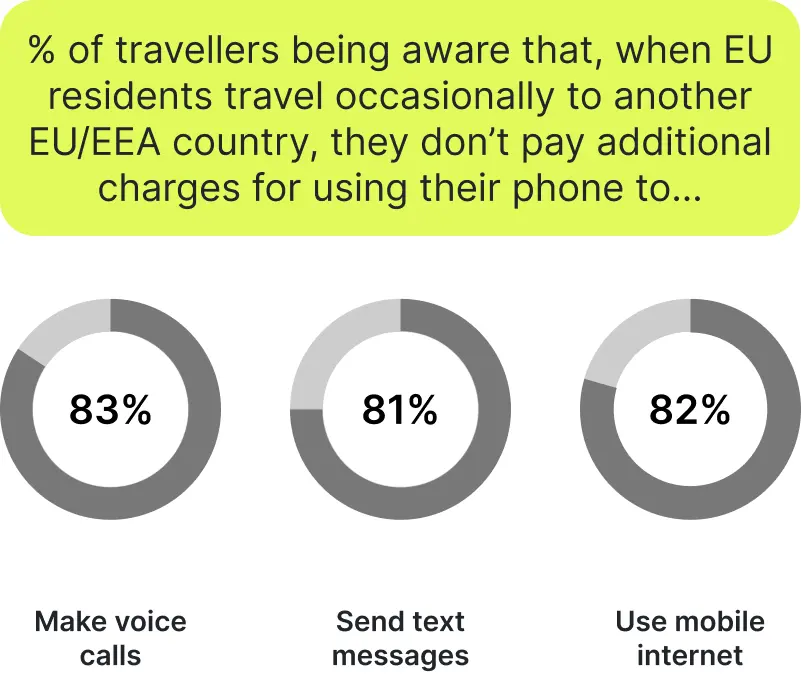
Here, the work takes place exclusively within one region, such as the EU. In these zones, there are simplified tariffs. In the European Union, for instance, there are the 2017 ‘Roam Like at Home’ rules. Travelers in the EU/EEA can use calls, texts, and data at domestic rates, subject to fair-use rules. This is an extremely convenient feature, the positive results of which are shown in the graph according to a survey from the European Commission.
Advantages and drawbacks of data roaming
Cellular data roaming has its benefits and drawbacks compared to eSIM or Wi-Fi, which should be considered beforehand.
Pros
Internet availability anywhere in the world
This feature provides a stable Internet connection even in the most remote places. Because of partnership agreements between operators, the user can use communication services without the need to change the SIM cards.
High security
Data transferred over the mobile network is encrypted. Unlike open Wi-Fi networks, mobile data is usually safer than open public Wi-Fi, but roaming is not risk-free. Cellular signaling systems such as SS7 and Diameter have known security weaknesses. Remember that any technology can be hacked in one way or another.
Support for the operation of IoT devices
IoT devices ranging from GPS trackers and smartwatches to remote home management systems continue their operation in any country for constant monitoring and access to data.
Cons
High cost
International roaming tariffs can be significantly higher than for services on the home network. This is due to inter-operator agreements and additional costs for data routing. For example, using the Internet on board an airplane or ship can cost dozens of times more.
Limited service support
Some plans may limit tethering, apply fair-use rules, or offer slower speeds on certain networks. For example, it is common to block all or certain types of VoIP calls and corporate VPNs.
Potential privacy risks
Even then, roaming can be subject to risks despite data encryption. Some vulnerabilities exist in the SS7 (Signalling System No.7) and Diameter protocols used for authentication. This is rare but possible in insecure networks.
How to prevent extra costs when using data roaming?
Explore tariffs and activate service packages
Check the tariff plans of the operator before the trip abroad. Most have special data packages with which you will be able to save significantly if using the Internet. You can connect, for example, a certain amount of traffic for a day, week, or month.
Limit the use of background data
Most applications use the Internet in the background, even when you don’t open them, and that is why they can be consumed so fast. Switch off auto-synchronization, automatic updates, and notifications to reduce unnecessary spending.
Disable a feature if you don’t need it
If you are not going to use the Internet, then disable this feature in the phone settings. This helps to avoid accidental traffic consumption, such as when an application starts downloading updates.
Plan traffic volume
Estimate in advance what you are likely to use: for instance, maps and messengers hardly use any traffic, while video calls and streaming will get the limit down in no time.
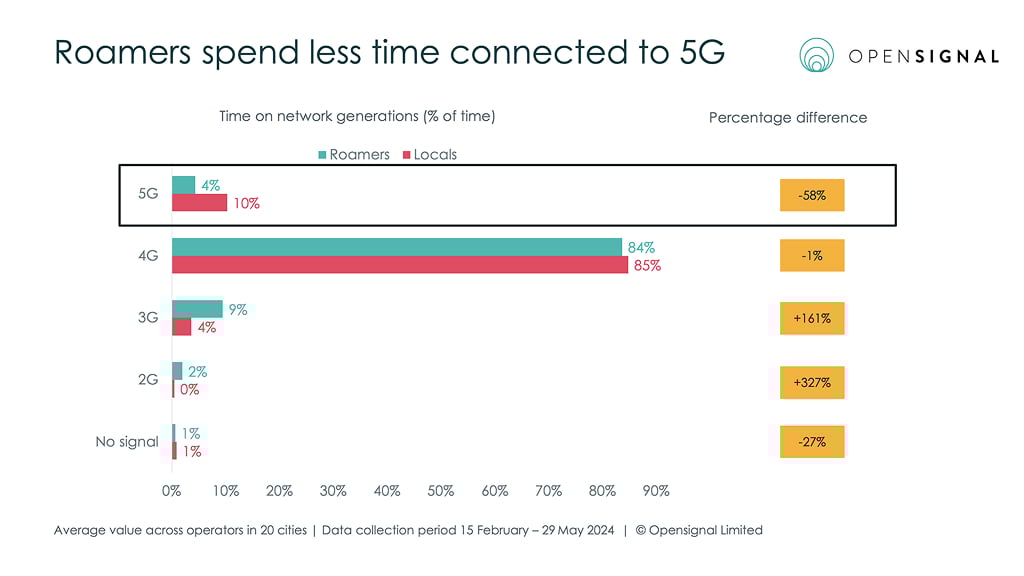
OpenSignal research showed the following results. They indicate that users in roaming are significantly less likely to use the Internet.
Control expenses through the carrier’s app
Most operators offer mobile apps where you can track ongoing expenses and remaining traffic. It helps to notice the limit exceeded in time and avoid high bills.
Data roaming alternatives
Local SIM card
The most popular solution when going to another country is buying a SIM card from a local operator: instant access to the local network and mobile Internet at favorable rates. It is crucial on long trips when it is important to stay in touch, but at the same time, and costs. Most of the local operators offer travel packages with Internet, calls, and SMS. To use a local SIM card, make sure that your phone is unlocked and supports the networks of that country.
Public Wi-Fi
Quite a lot of places, including hotels, cafes, airports, and shopping centers, have free Wi-Fi. This is the way to be in touch without any extra costs. Such networks are often found in tourist areas and are thus easy to use. However, one should not forget about security: when connecting to public networks, it is better not to send any sensitive data and to use a VPN for data protection. It is good for those who don’t need an Internet connection all the time.
International SIM cards
They are specially developed for trips, allowing one to use the Internet, calls, and SMS in different countries. They will be good for those who move frequently between countries because they offer fixed tariffs for services. It is possible to buy an international SIM card in advance and then activate it before the trip. International SIM cards work through the supported networks of operators around the world, ensuring a stable connection. Using such an action helps to keep your number for communication while minimizing the expenses regarding all communication services on roaming.
eSIM technology
eSIM is a digital SIM format that lets you add a mobile plan without inserting a physical card. It enables connecting to a network of a local operator without the use or even availability of a physical SIM card.
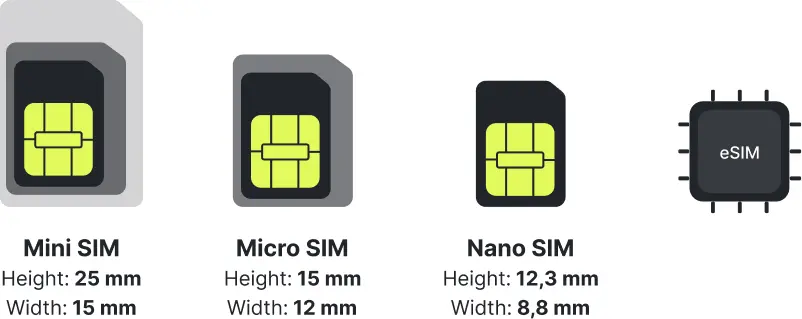
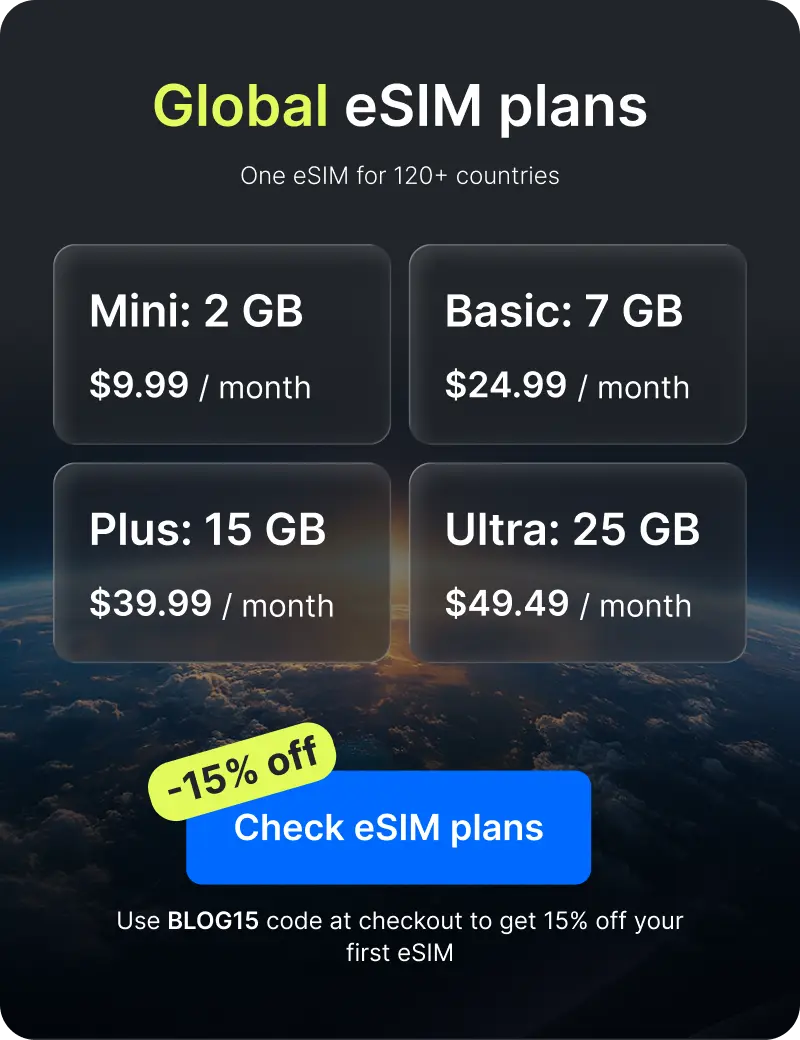
You can get the eSIM beforehand – download a profile via an app or scan an Ohayu eSIM QR code, and activate the profile in your destination country. This means you don’t need to waste time looking around for local SIM cards, visiting operator offices, and swapping physical SIMs. An eSIM is often a lower-cost digital alternative to home operator roaming on many routes.
- Easy activation.
- Multi-profile storage: many modern smartphones have multiple eSIM profiles, so you can change providers very easily and have several profiles for different countries at the same time.
- Durability and convenience: physical SIM cards are inconvenient and can be easily lost, but you cannot lose or damage an eSIM.
- eSIMs can be cheaper because they allow users to access local networks without high roaming charges from their home carriers.
- Compatible with most modern devices: many high- and mid-range smartphones produced after 2022 are eSIM-compatible.
How to start using eSIM
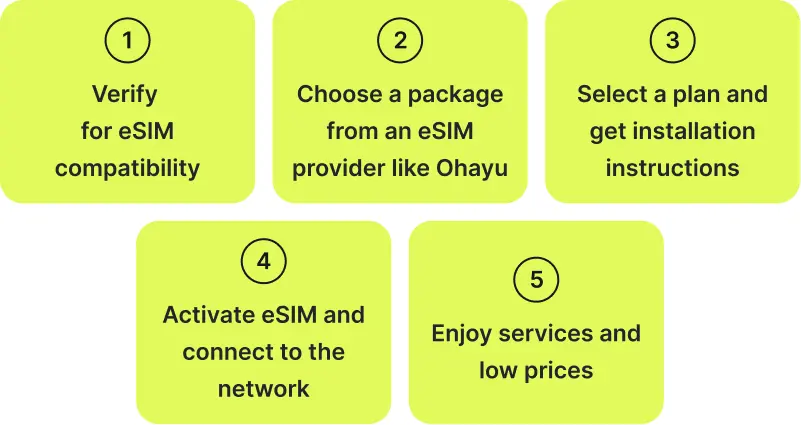
- Verify for eSIM compatibility.
- Choose a package from an eSIM provider like Ohayu.
- Select a plan and get installation instructions.
- Activate eSIM and connect to the network.
- Start using mobile data.
Final words
Data roaming is a quite beneficial feature that allows you to stay connected while traveling the world. Despite its many advantages, it also has some weaknesses, the most painful of which is the high price. Therefore, sometimes it is better to use alternative solutions, such as eSIM. And the Ohayu travel eSIM can be one alternative if standard home operator roaming charges are too high.