
To transfer a SIM card to an eSIM, you should check if your phone supports this technology, then use your carrier’s app or scan a QR code to activate the eSIM profile.
The built-in chip lets users activate tariffs in minutes, store multiple numbers on one device, and easily change operators – without visiting the office or waiting for delivery. This is especially convenient for traveling, as you can use personal and work numbers simultaneously or free up a memory card slot.
However, transferring to an eSIM raises questions even for experienced users. How do I switch my number from a regular SIM? Which smartphone models support this function? And what to do if the operator does not issue a QR code? In this article, we will find clear step-by-step instructions for the iPhone, Google Pixel, Samsung, and Xiaomi.
Why convert to an eSIM?
Switching can be a not-so-obvious step until you value its advantages. The tech is not merely a trend; it is an intelligent choice. Here are five reasons why it’s necessary to do it right now.
No longer dependent on plastic
No more searching for a clip to remove the SIM card tray, fear of losing the tiny chip, or waiting a few days for a new card to arrive. The eSIM is activated remotely: all it takes is a QR or code from the carrier. This is especially convenient if you’ve changed phones and want to transfer your number in minutes rather than hours.
Multiple numbers on one device
You have the option to store up to 10 profiles (depending on the smartphone model). For example, on iPhone 15, you can activate work, personal, and travel profiles at the same time. Switching between them is a two-touch process in the settings – ideal for those who want to split calls or use local tariffs when traveling without changing SIMs.
Perfect for traveling
You are no longer dependent on local operators. Before traveling to the US, Europe, or Asia, buy a data package for the country you are visiting through the app. It’s cheaper than roaming and saves you from searching for stores at the airport. And when you return, simply deactivate the temporary profile.
Increased safety
A physical subscriber module can be swapped out and inserted into another device, so it’s a softer target for number theft. eSIM is bound to the device: even if the smartphone gets stolen, it will be harder for an attacker to port your profile and break your account password (Apple ID, Google, etc.).
Free up the slot for other uses
Some smartphones have a hybrid slot. You can take advantage of this and place either a second subscriber identity module or a memory card. Simply transfer the main number to a virtual profile and use both slots – for an additional network identifier or microSD.
How do I turn my existing SIM into an eSIM?
Make sure that the device is eSIM-compatible. Many newer models from Apple, Samsung, Google, and other brands have this feature. Users may verify this in the phone settings or on the manufacturer’s website. If you use a quality service to purchase a virtual card, check compatibility there, too. For example, Ohayu has an online compatibility check function.
Look up the carrier’s policy
- Visit the operator’s official website and look for sections like “Digital SIM” or “Switch to eSIM”.
- Use the operator’s app (e.g., My Vodafone or T-Mobile) – activation is often available right there.
- Write to support: “May I transfer my physical SIM to eSIM profile?”
Check the subscriber identity module type
Older variants (released before 2020) might not be migration-capable. What to do:
- Put the SIM card in the phone. If your phone has a transfer setting option (found on iPhone and Pixel), then the card will be supported.
- Pick up a new network identifier from your carrier. The new cards are provided free of charge by most carriers and can be converted into eSIMs.
Take into account regional restrictions
- EU countries: This option is available from nearly all operators. Local plans, including citizenship-based plans (e.g., Spain), are exceptions.
- USA: The technology is available on all major operators, but number activation can have an American number involved.
- Asia/Africa: Virtual profiles are typically distributed by international rather than by local operators.
How to transfer a SIM to an eSIM: step-by-step instructions
Converting is easy and only takes a couple of minutes. While the process is very similar for most devices, there may be some differences depending on your phone model. Here’s how to do this on your smartphone.
Iphone
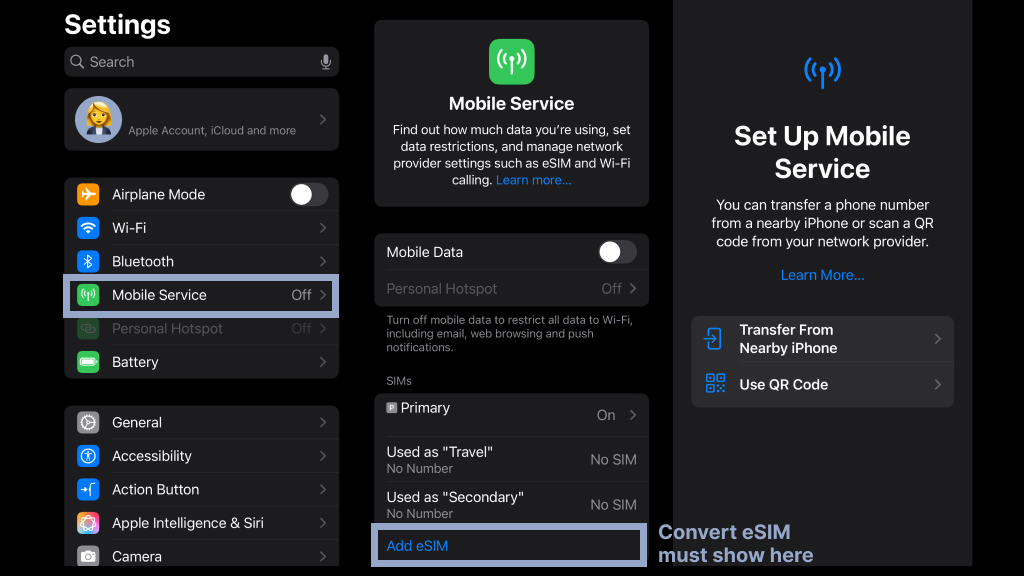
- Open the “Settings” app from the home screen or through Spotlight search.
- Go to the “Cellular” tab in the main settings menu.
- Press “Add Cellular Plan,” and then consent to doing this by tapping “Allow” from the prompt window.
- Tap the “Use QR Code” button to scan to automatically turn on the eSIM.
- Scan your carrier’s QR code by aligning the camera directly on the image, or enter it manually by selecting the “Enter Manually” option.
Google Pixel
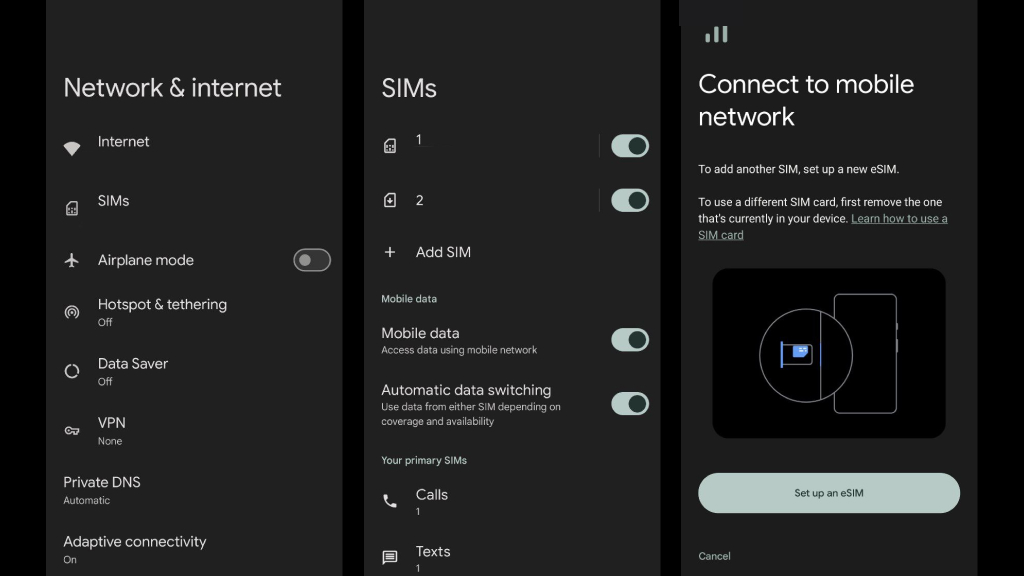
- Open the settings of your Google Pixel by clicking on the gear icon in the app drawer or home screen.
- In the “Network & internet” section, scroll down and click on the “SIMs” setting to access the management of your cards.
- Click on the “Add SIM” button, and you will be asked to set up a new cellular plan.
- Click on the “Set up an eSIM” setting to start activating an embedded SIM.
- Scan the QR code of your carrier or select to enter information manually.
Samsung

- Open Samsung settings by pulling down the notification bar and clicking on the gear icon or searching for it in the app drawer.
- Click on the “Connections” setting, where all network settings are controlled.
- Tap on “SIM manager” in the list to open and control installed cards and profiles.
- Select “Add eSIM” to start installing a new embedded SIM on the phone.
- Select your desired way of adding it — either by scanning a QR code from the carrier or manually entering the information – and proceed with the on-screen instructions to activate it.
Xiaomi
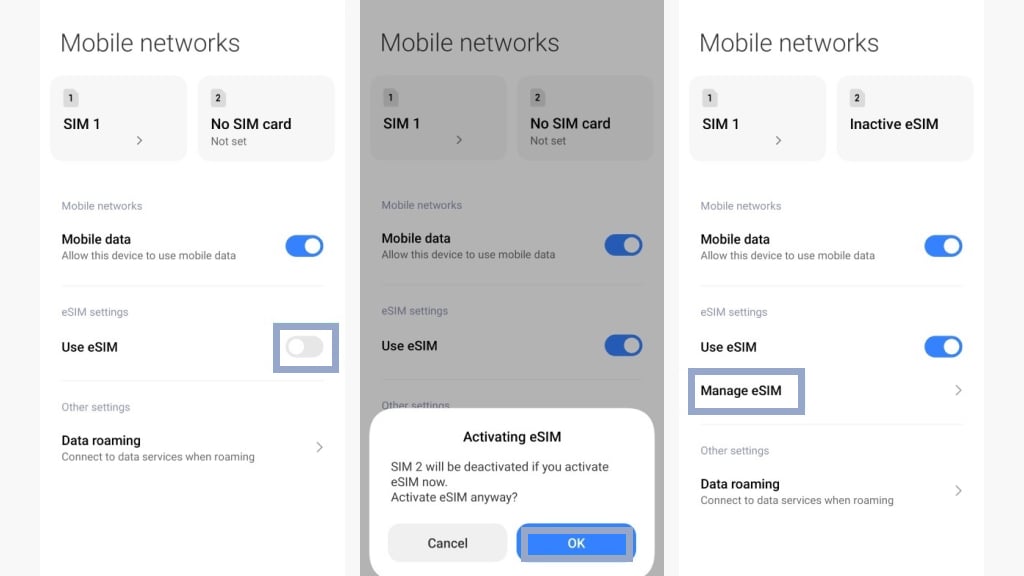
- Open Xiaomi settings.
- Scroll down and select “SIM & mobile networks”.
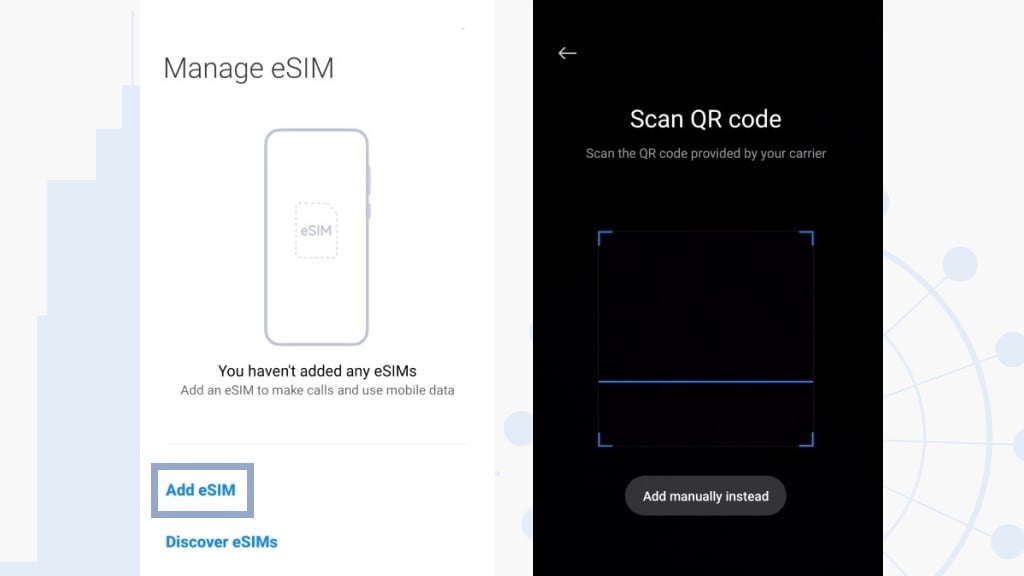
- Select “Use eSIM” to start the installation process of a new embedded profile.
- Choose the activation option of preference – either scan the QR code on your carrier or enter in the details manually.
- Keep following the on-screen instructions to finish the activation and fill in all the details in the correct order.
eSIM and security
The built-in communications module is not bulletproof armor but a mutation of the attack surface. Where in the physical SIM, the attacks were confined to chip cloning or SIM-swap via social engineering, here the threat is migrating to the digital realm. Let us see how defense mechanisms are in place and where backdoors remain.
Security architecture: PKI and secure element
The eSIM utilizes a Public Key Infrastructure (PKI) and an embedded Secure Element (SE), an isolated chip certified to the Common Criteria EAL 4+ standard. The profile is encrypted with AES-256 during transmission from the SM-DP+ (carrier server) to the device. However:
- Vulnerability in the chain of trust: If a hacker compromises GSMA RSP certificates, they can sign a dummy profile. In 2021, exploits in the TEE (Trusted Execution Environment) API on Qualcomm Snapdragon allowed the injection of modified profiles via DMA attacks.
- Keys in SEs don’t last forever: Cryptographic keys are generated during chip manufacturing. Weak entropy at the manufacturing stage (e.g., in cheap eSEs from Chinese OEMs) makes them vulnerable to brute-force via side-channel attacks.
Primary attack vectors
- Physical access + chip desoldering: The chip, integrated into the motherboard, can theoretically be desoldered using microscopes and FIB (Focused Ion Beam) equipment. This enables extracting cryptographic keys via decapsulation and probing the ISO 7816 bus. In 2022, HexLab researchers demonstrated RSA key recovery from a Samsung Galaxy S21 chip by analyzing electromagnetic emissions (EMPA).
- JTAG interfaces & memory dumping: On devices with unlocked bootloaders (e.g., rooted Android), attackers dump data from the SE via JTAG debug interfaces. Tools like SIMcloner have been adapted for it since 2022.
- MITM attacks: Intercepting activation QR codes via shoulder surfing or phishing emails (e.g., fake “carrier” pages). In 2023, the Lazarus group used forged Vodafone DE pages to steal profiles.
- SM-DP+ Exploits: Hacking carrier servers (e.g., via Apache Tomcat vulnerabilities like CVE-2023-46589) enables mass eSIM generation for targeted numbers. Such cases are documented on darknet markets (e.g., “bind to any number” services).
Persistent SIM swap risks
Integrated communications technology does not eliminate the core issue – social engineering. If attackers convince a carrier to port your number to a new card (e.g., using forged IDs in-store), the SE’s protections are irrelevant. In the U.S., such attacks rose by 78% (FTC, 2023).
Conclusion
Transferring to an eSIM is similar to breaking from paper maps to Google Maps: it is a small thing until you make the switch. There is no longer a need to search for a needle to remove the SIM tray, and on trips, you can forget searching for a local operator between Duty-Free stores. Yes, you will need to sort out QR codes and settings initially, but then you’ll be changing tariffs quicker than Netflix increasing their prices. The main thing is not to lose the phone: you can’t remove the built-in SIM card, but it can’t be accidentally dropped either. In most cases, this is the time when technology simplifies life.