
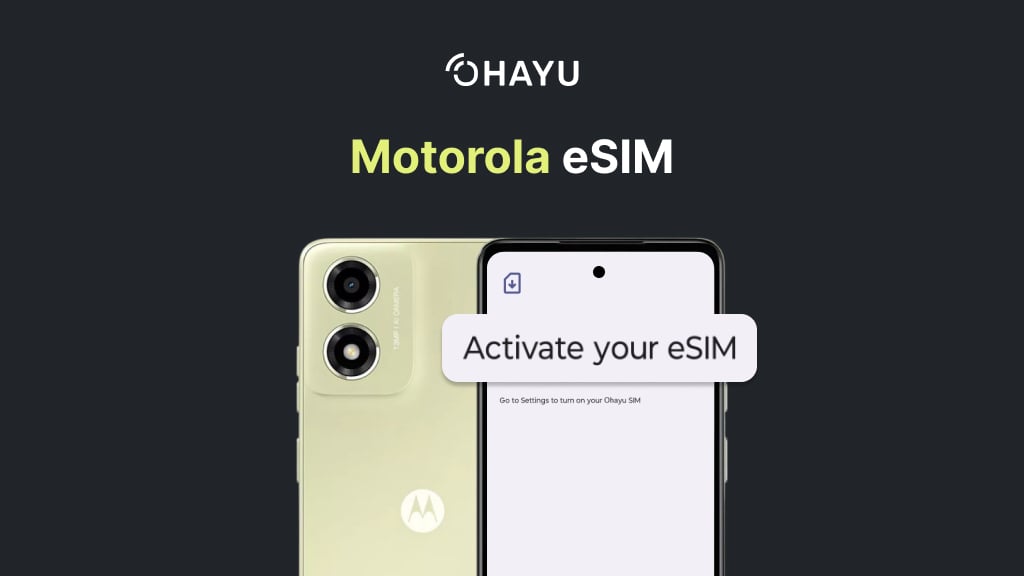
The shift to eSIM technology began in 2018, when providers such as Plintron launched eSIM solutions for IoT and consumer devices. Motorola entered the market in 2020 with the foldable Motorola Razr, its first phone to support eSIM. Since then, eSIM has been included in several models of the Razr, Edge, and Moto G series.
Thanks to these updates, travelers using Motorola eSIM phones can connect to local networks with providers like Ohayu and easily get mobile internet in 170+ countries.
In this guide, we’ll cover which Motorola phones support eSIM, how to install and activate it step by step, and what the future of Motorola eSIM development might look like.
What is eSIM
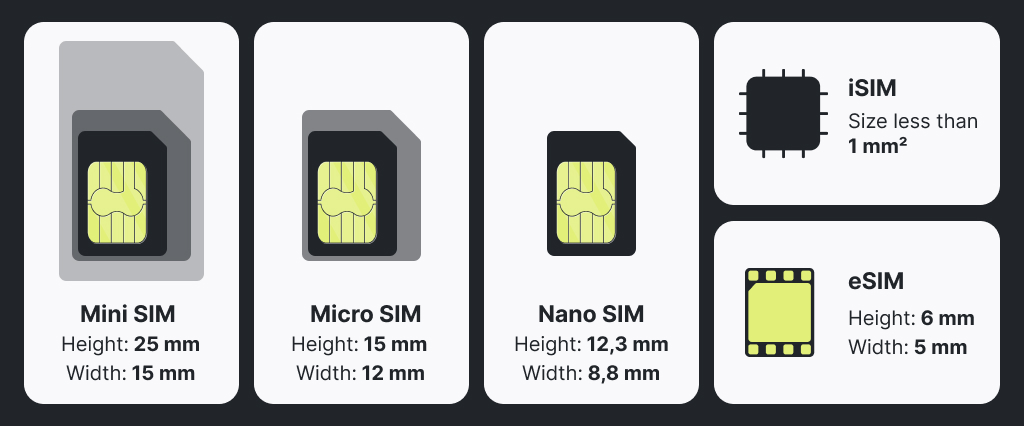
An eSIM is a digital version of the traditional SIM card. Instead of inserting a small piece of plastic into your phone, on modern models, you have the eSIM, a tiny chip built directly into the device. With it, you can store multiple data plans, switch between network carriers, and activate the service entirely online. That also means no more juggling SIM cards when traveling.
Read more: What is eSIM – compatibility, installation, reviews
Motorola, known for its long track record of innovation – including the world’s first handheld mobile call in 1973 – was quick to make a shift to digital SIM cards. By 2019, Motorola began adding eSIM support to select models, which gave users the luxury of card-free connectivity across its Razr, Edge, and Moto G smartphones.
Motorola phones with eSIM support
eSIM is available mainly on Motorola’s newer and higher-end phones. As we’ve already mentioned, it started with the Razr in 2019. Over the years, the company has expanded support to its foldables, flagship Edge line, and even mid-range Moto G devices. Below is the list of Motorola models confirmed to support eSIM by GSMarena.
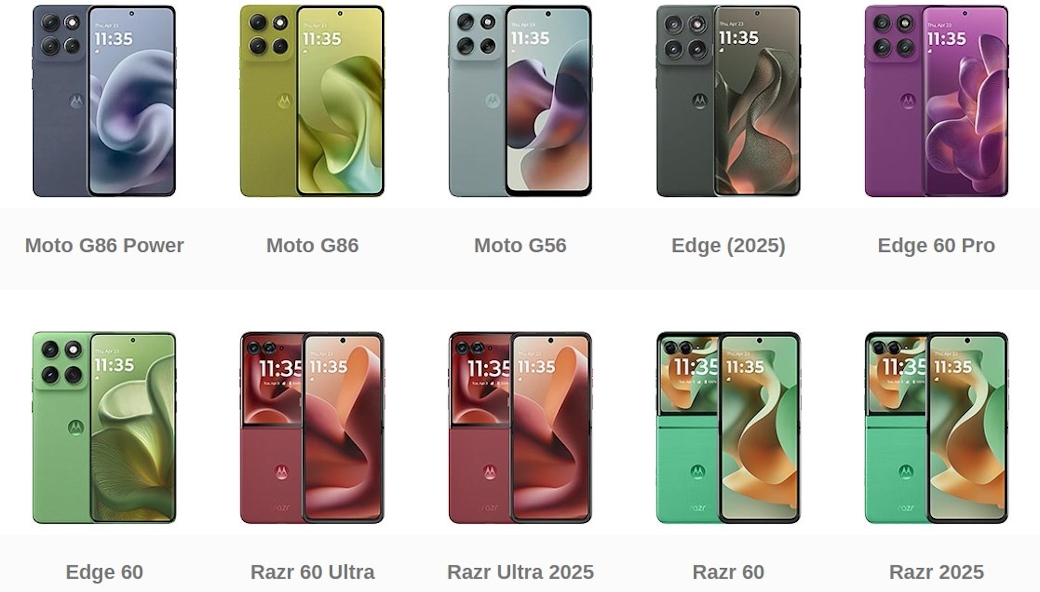
Razr series
- Motorola Razr Ultra (2026);
- Motorola Razr Fold (2026);
- Razr Ultra 2025;
- Razr (2025, 2024, 2022, 2019);
- Razr+ (2025, 2024);
- Razr 40, 40 Ultra, 50, 50 Ultra, 60, 60 Ultra;
- Razr 5G;
- Motorola Razr FIFA World Cup 26 Edition.
Edge series
- Edge (2026, 2025, 2024, 2023, 2022);
- Edge 60, 60 Pro, 60 Stylus, 60 Fusion;
- Edge 50, 50 Neo, 50 Ultra, 50 Fusion, 50 Pro;
- Edge 40, 40 Neo, 40 Pro;
- Edge+ (2023).
Moto G series
- Moto G Play (2026)
- G34, G35, G53, G54, G54 Power, G55, G56, G75, G85, G86, G86 Power;
- G Stylus 5G (2026, 2025, 2024);
- G Power (2026, 2025, 2024);
- G (2026, 2025, 2024).
- G Stylys (2026)
Other models
- ThinkPhone 25.
With eSIM-enabled Motorola phones, you install a data-only travel eSIM from providers like Ohayu, which is especially handy for international trips. All you need to do is check the device compatibility, choose the plan, and install your eSIM online.
How to check eSIM compatibility on Motorola
If your Motorola device isn’t listed above, you can quickly verify if it supports eSIM. The easiest way is to check the settings.
- Open Settings.
- Go to Network & Internet.
- Select the Mobile network or SIMs & mobile network.
- Look for an option to Add eSIM or Download a new SIM.
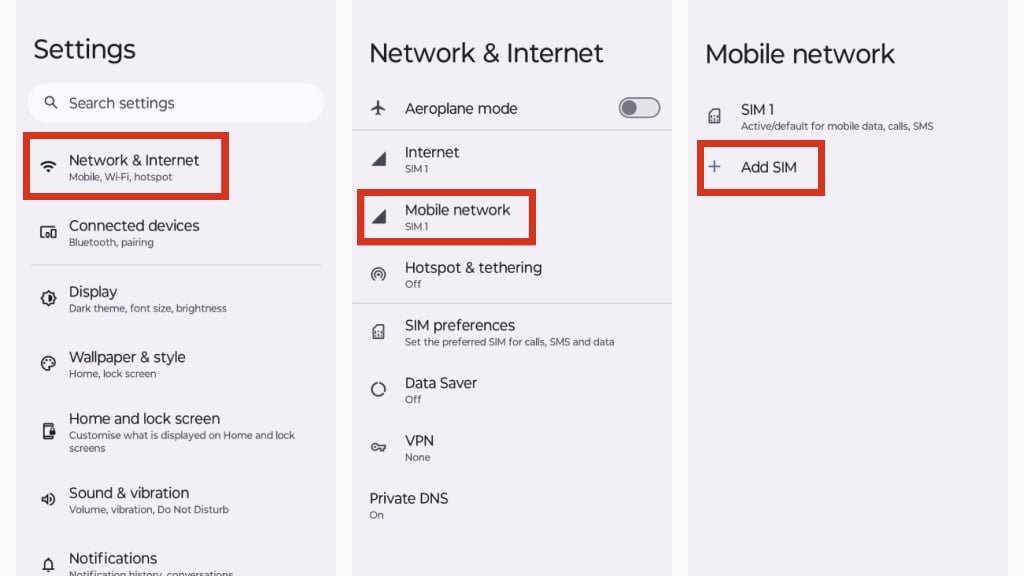
If this option is available, your phone supports eSIM.
For a quick compatibility check, dial *#06# on your phone. This isn’t a call, it’s a request to your device to display information, and you won’t be charged. If you see an EID number displayed, your device supports eSIM. The EID (Embedded Identity Document) is your unique eSIM slot number.

You can also find EID in settings. Go to Settings > About phone > Status information. If you see an EID, the phone is eSIM-capable. If you don’t see either of these options, your smartphone is likely incompatible.
Motorola eSIM activation
Once you’ve confirmed that your Motorola phone supports eSIM, the next step is activation. Activating an eSIM is quick, and in most cases, it only requires scanning a QR code. Here’s a general step-by-step guide.
- Buy a data plan. For Motorola users, we recommend Ohayu country-specific plans if you’re visiting just one or a few countries, or a Global subscription covering 120+ countries, which automatically switches carriers as you cross borders.
- You will receive a QR code in your iOS or Android app.
- Connect to Wi-Fi and open Settings > Network & Internet > Mobile network or SIMs & mobile network > Add eSIM or Download new eSIM.
- Your camera will open automatically – use it to scan the QR code from step #2.
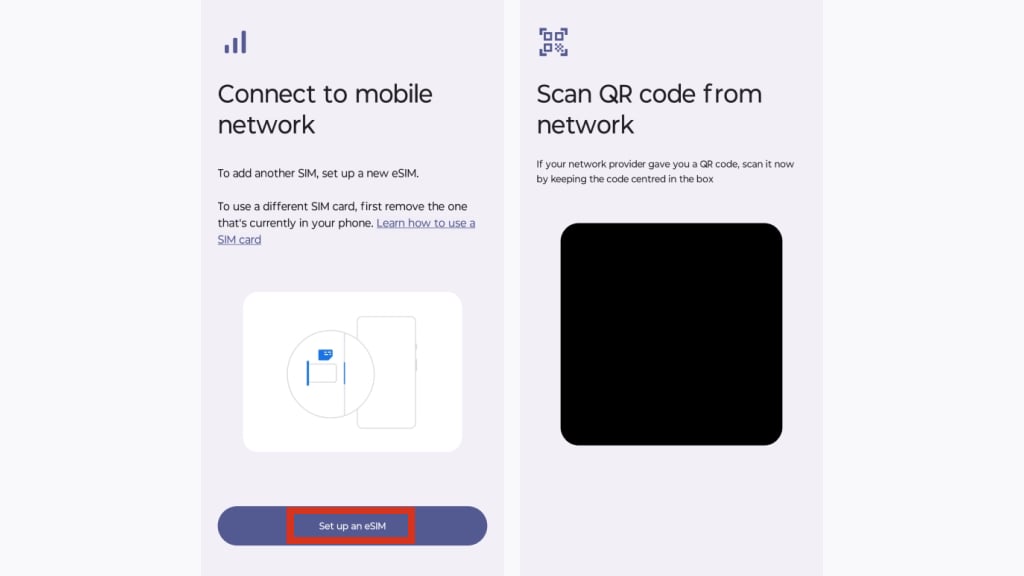
- Follow the on-screen instructions, and your eSIM will be ready to use within minutes.
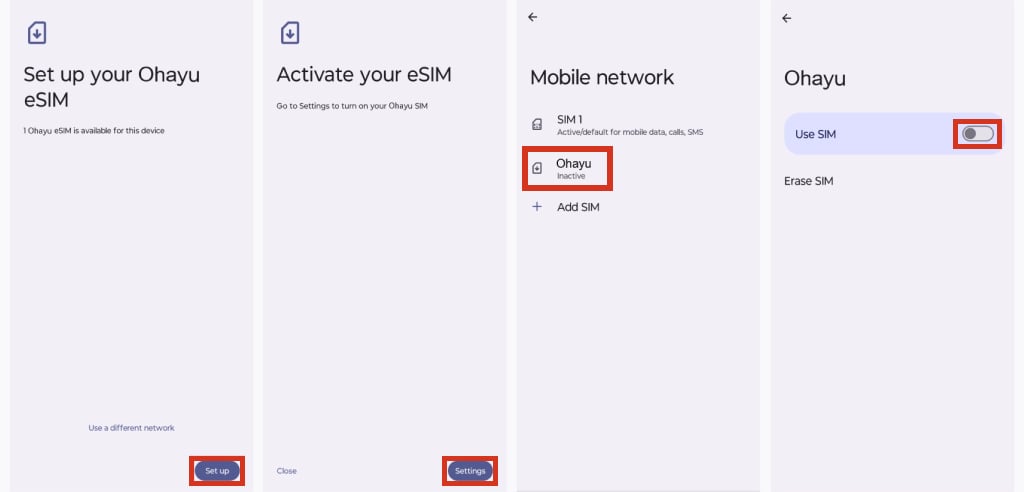
Manual activation (if needed)
If scanning doesn’t work, you can activate manually using an activation code provided by your carrier. On the QR screen, select Need help? and enter the code with any additional details.
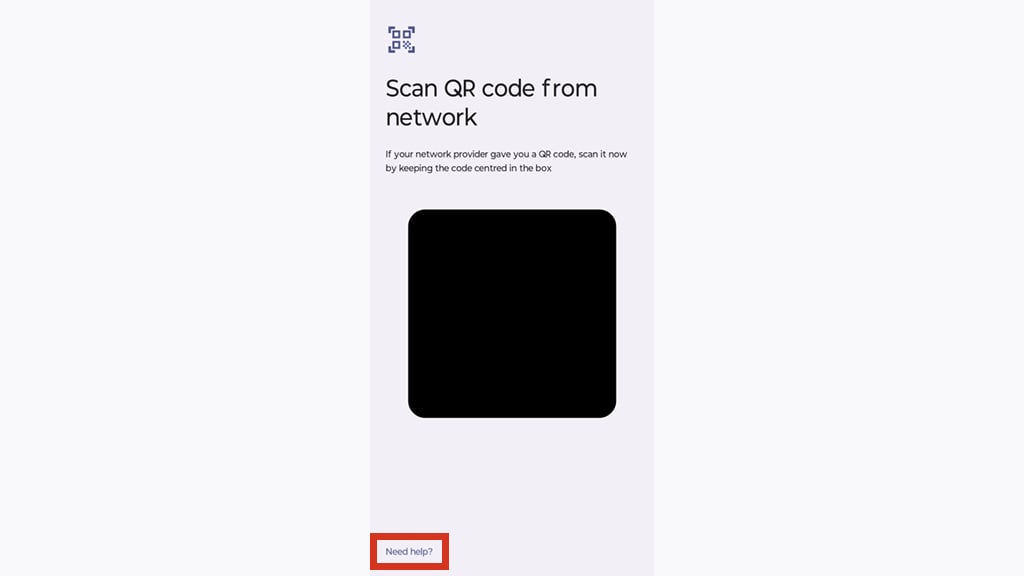
For a visual walkthrough, check this Motorola eSIM setup guide on YouTube.
Troubleshooting Motorola eSIM issues
Even with a correct eSIM setup, occasional issues can occur on the hardware or provider’s side. Here’s a quick checklist of common problems and causes.
| Issue | Reason |
| Can’t see eSIM in Settings | Device/variant doesn’t support eSIM; eSIM disabled by carrier/region; outdated Android. |
| QR code won’t scan | Poor lighting/focus; dirty lens; QR printed too small; camera permissions; unstable internet. |
| Installation fails | Captive/weak Wi-Fi; VPN/firewall blocking; profile already used/expired; too many eSIMs stored; device/carrier lock; OS too old. |
| No service after activation | eSIM profile not enabled for data/calls; data roaming off; wrong network selected; APN missing; competing SIM set for data; limited coverage. |
If you can’t find the eSIM in settings
First, confirm that your Motorola device supports eSIM.
- Check Settings > Network & Internet > SIMs (or Mobile network) for Add eSIM. If it’s missing, your phone may be incompatible.
- Dial *#06# or go to Settings > About phone > Status and look for an EID. No EID = no eSIM.
- Update Android, then reboot.
- Verify your exact model and region support eSIM.
If your QR code doesn’t scan
This is usually one of the most common challenges. Try these steps.
- Improve lighting & hold the phone 15-25 cm from the QR, clean the lens.
- Zoom the QR on another screen or print it larger.
- Ensure Wi-Fi (or a stable data connection) is on.
- If scanning still fails, choose Enter details manually and input the SM-DP+ address and activation code.
If the eSIM installation fails
You’ve scanned the code, but the installation is unsuccessful. This is what you do next.
- Use open, stable Wi-Fi (avoid captive portals that require authentication). If you use VPN, turn it off, and retry.
- Restart the phone.
- Remove old or unused eSIM profiles (if you’ve hit the device profile limit) and try again.
- Update Android.
- If you have a carrier-locked Motorola device, contact the carrier or check Motorola/carrier settings (Settings > General > About > Carrier Lock) to confirm that it accepts third-party eSIMs.
- Try manual activation (SM-DP+ and code), double-check the code to avoid typos.
You see “No network” or “No service” after activation
If the profile is activated but your Motorola device can’t connect, the fix may require the involvement of both you and the provider. Try these steps.
- Go to Settings > Network & Internet > SIMs, toggle the eSIM On, and set it as Preferred for mobile data.
- Enable Data Roaming.
- Try Airplane mode on/off and restart.
- Set Network type to 5G/4G/auto (not 5G-only) and try manual network selection.
- Check or add the provider’s APN.
- Temporarily disable your physical SIM for data.
- If still offline, contact the support to check the provisioning issues.
Most common eSIM issues on Motorola devices should now be resolved. And once your eSIM is up and running, you may still wonder about its pros and cons compared to the traditional physical SIM card you’ve been using for years.
Physical SIM vs eSIM for Motorola
Which is better depends on your needs. Here are the pros and cons of each.
Physical SIM Card
- Pros: Can be easily removed and placed into another device. Works with older phones, making it widely supported
- Cons: Easy to lose or damage. Requires a physical slot inside the phone. Only one card can be used per slot. Tied to one network carrier unless replaced.
eSIM
- Pros: Easy to set up and secure. Supports multiple profiles on one device, allowing you to switch between networks. Convenient for travelers. Eco-friendly – no plastic card required.
- Cons: Not yet supported by all phones. Transferring between devices can be challenging for non-technical users (though the process is improving).
For Motorola users, eSIM can offer flexibility, easy activation (with providers like Ohayu), and convenience, especially when traveling or using alternative internet access.
Motorola eSIM FAQ
No. eSIM is mostly included in newer models like the Razr (2019 and later), Edge (2022–2024 models), and select Moto G devices such as the G53, G54, and G Stylus. Always check the phone’s specifications or settings.
Yes, if your Motorola device has a card slot (supports eSIM and dual SIM), you might use both SIM and eSIM together. This setup is called Dual-SIM Dual-Standby (DSDS), and it allows you to keep one SIM for calls/SMS and another (often the eSIM) for data, which is especially useful while traveling.
Not all versions are. For example, Moto G 5G (2024) and Moto G Stylus 5G (2025) are eSIM-compatible, but the Moto G Stylus 5G (2023) and Moto G Power 5G are not. Older Moto G models typically support only nano-SIM.
Yes, the Moto G (2025) supports eSIM.
Future of Motorola eSIM
What’s next for Motorola and eSIM? Following Apple, Samsung, and Google Pixel’s latest releases, we will certainly see even wider adoption. Until recently, eSIM support was limited to premium devices and limited series, but we’re already seeing it expand into mid-range and entry-level smartphones. In the coming years, most new Motorola releases are likely to include eSIM as a standard feature (with some exceptions, which depend on model, region, and carrier policy).
We can also expect new usability improvements. Features like easier data profile transfers between devices, instant carrier switching, and deeper integration with wearables or IoT devices are on the horizon. Given Motorola’s track record with innovations such as the 2020 foldable Razr and its recent Edge and G series expansions, the brand is well-positioned to remain at the forefront of eSIM adoption.
The shift toward fully digital connectivity is accelerating, and eSIM will be a central part of it. If you’re considering a new Motorola phone, choosing an eSIM-capable model is a smart way to future-proof your device.