Can I add an eSIM to a carrier-locked phone?
If your phone is locked to a specific network, your eSIM won’t work. A locked device can’t connect to eSIMs from other providers — including Ohayu — until it’s unlocked. However, you can try contacting your network provider and ask them to unlock the phone remotely, especially if the phone is fully paid off.
What does “carrier-locked” mean?
A carrier-locked phone — sometimes also called network-locked or SIM-locked — is a mobile device that can only work with one specific mobile network operator. The carrier or manufacturer sets this limitation, usually by adding software that restricts which SIM cards or eSIM profiles the phone can use.
A carrier-locked phone only recognizes and connects to SIMs or eSIMs from that network. For example, a phone bought through AT&T may refuse to activate a T-Mobile or Ohayu eSIM. If you try, the device might display messages such as “SIM not supported”, “Network locked”, or “Unable to complete cellular plan activation.”
In short, carriers lock phones on purpose so they work only on one mobile network until you unlock them.
Can I use an eSIM on a locked phone?
The short and direct answer is no — in almost all cases, you can’t use an eSIM from another provider on a locked phone. A carrier lock restricts your device to one network, and this rule applies equally to both physical SIM cards and embedded eSIMs.
If you try to install an eSIM from another provider, your phone will simply block the activation because it doesn’t recognize that network as authorized. Think of it like a gatekeeper — if your eSIM’s “name” isn’t on the carrier’s approved list, it won’t get access.
The only exception happens when you add an eSIM from the same carrier that locked your phone. But if you want to use an affordable local or travel eSIM, you’ll need to unlock your device first. Once unlocked, your phone can freely connect to any compatible network worldwide. You can check if your device supports eSIM in our compatibility guide.
Why carriers lock phones
Carriers lock phones to control which networks those devices can use. The carrier’s lock ties your phone to its own SIMs and eSIM profiles, so other networks can’t activate service until you remove it. If your eSIM doesn’t activate after unlocking your phone, see why your eSIM isn’t activating.
The main reasons are:
- Subsidy and financing recovery. When a carrier sells a device at a discount or on installments, it locks the phone to make sure you pay the full bill before switching to another network.
- Customer retention. Locks reduce churn during the initial contract or commitment period.
- Fraud and theft deterrence. Limiting a device to one network can make it less attractive to resell quickly after purchase with stolen payment details.
- Technical and policy control. Some carriers restrict features, firmware updates, or network settings to match their policies and testing.
Policies vary by country and carrier. In the U.S., new phones are commonly locked for a short window (for example, many devices auto-unlock after about 60 days). Since 2017, Canada requires phones to be sold unlocked, and since 2021, the UK has moved to selling new handsets unlocked as well. If your phone came from a carrier on finance, it may stay locked until the account is in good standing or the device is paid off.
Consumer and digital rights groups, such as Public Knowledge in the United States, have long argued against carrier locking. They point out that it limits competition, makes travel harder, and stops people from reusing or reselling many older devices.
How to check if your phone has a carrier lock
Checking the lock status takes less than a minute — you can do it directly in your phone settings or by inserting another SIM card.
Check if your iPhone has a carrier-lock (iOS)
Go to Settings
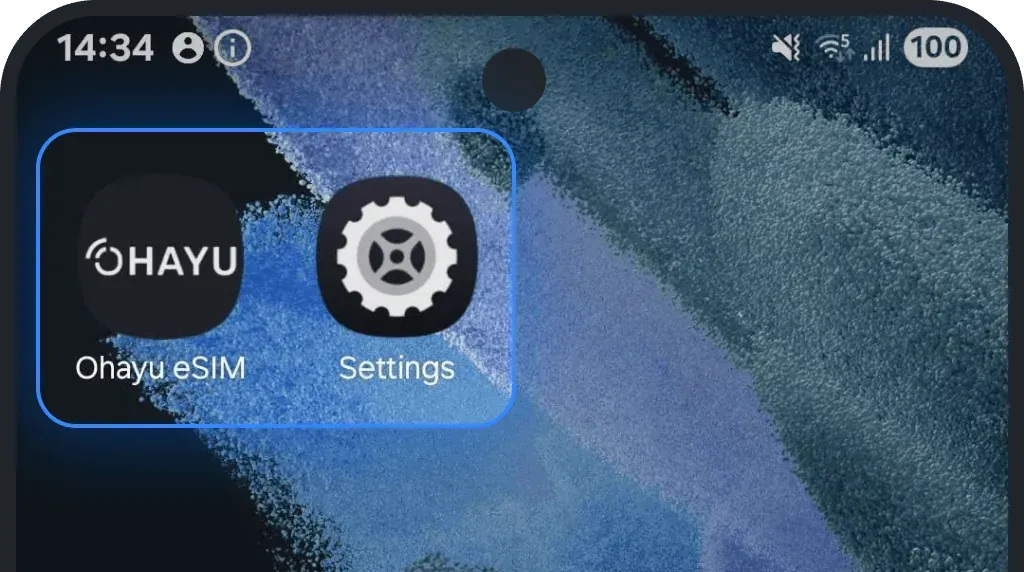
Tap General
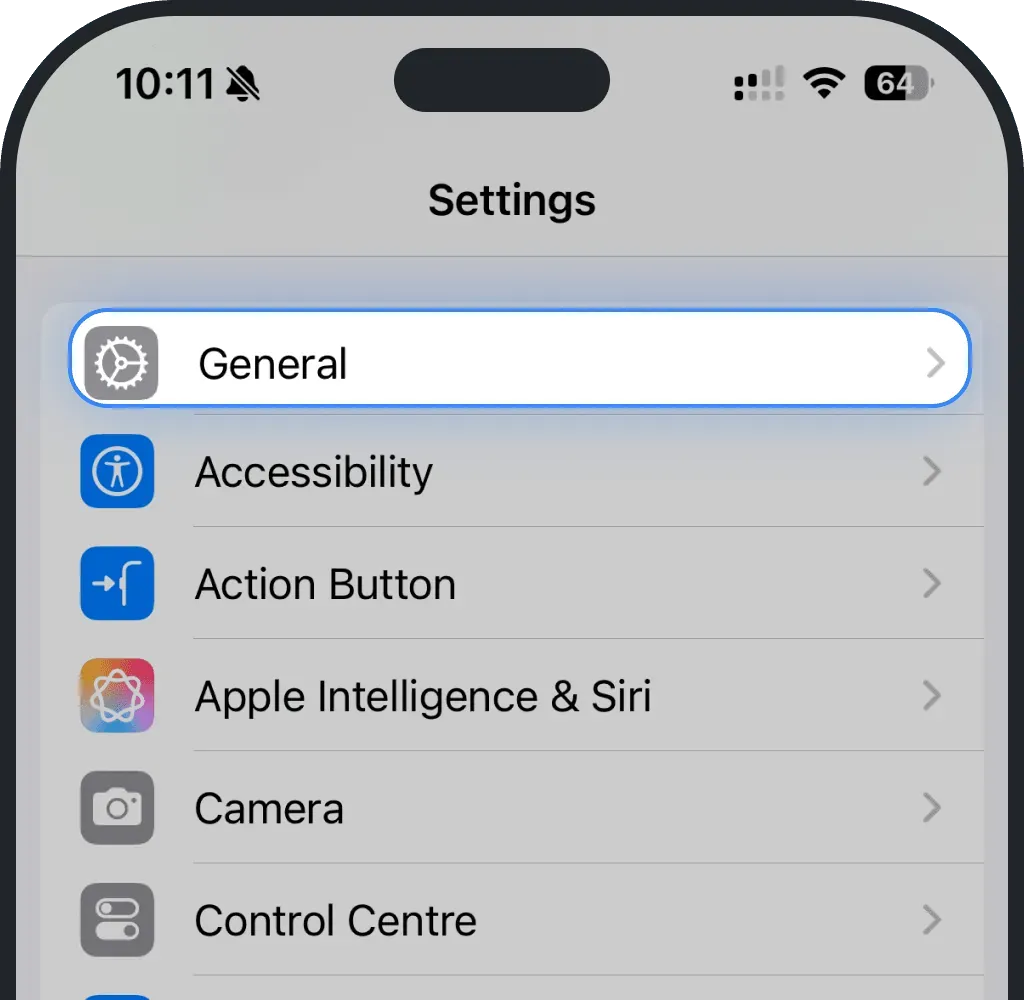
Tap About
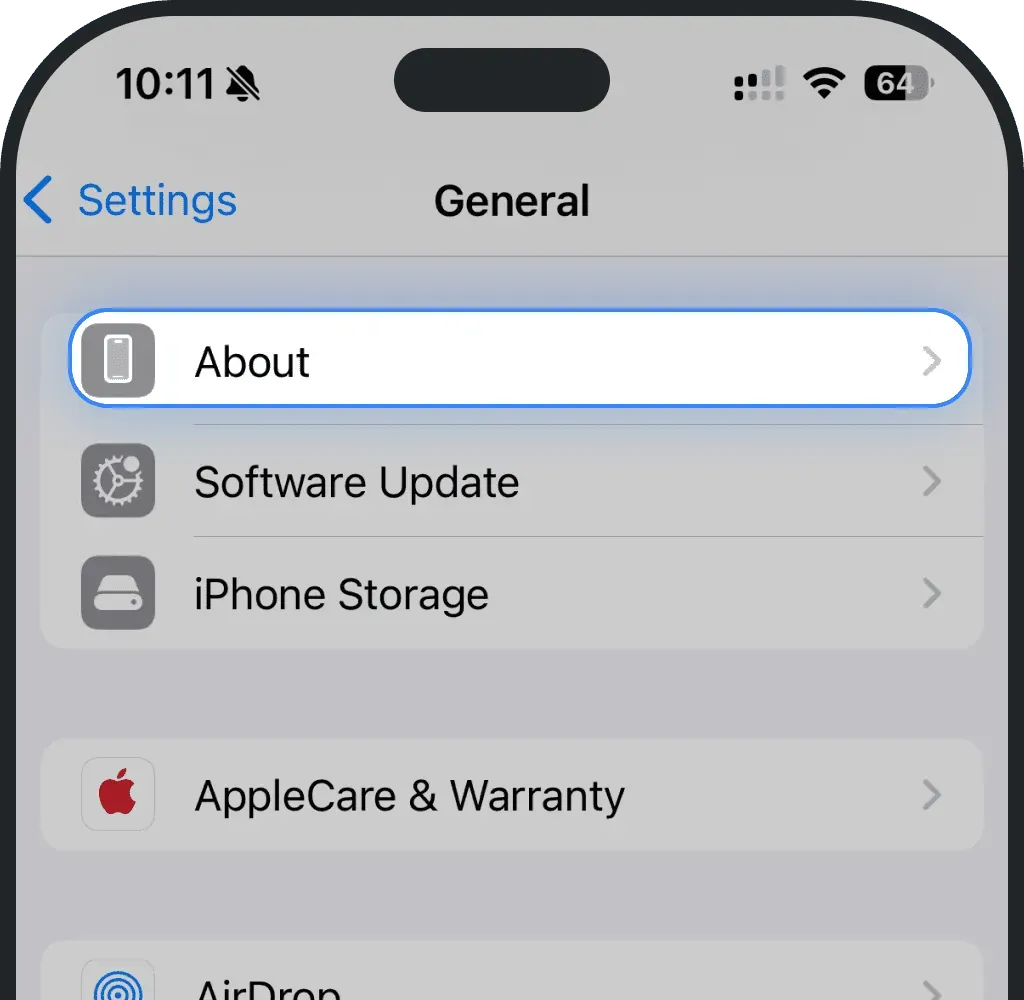
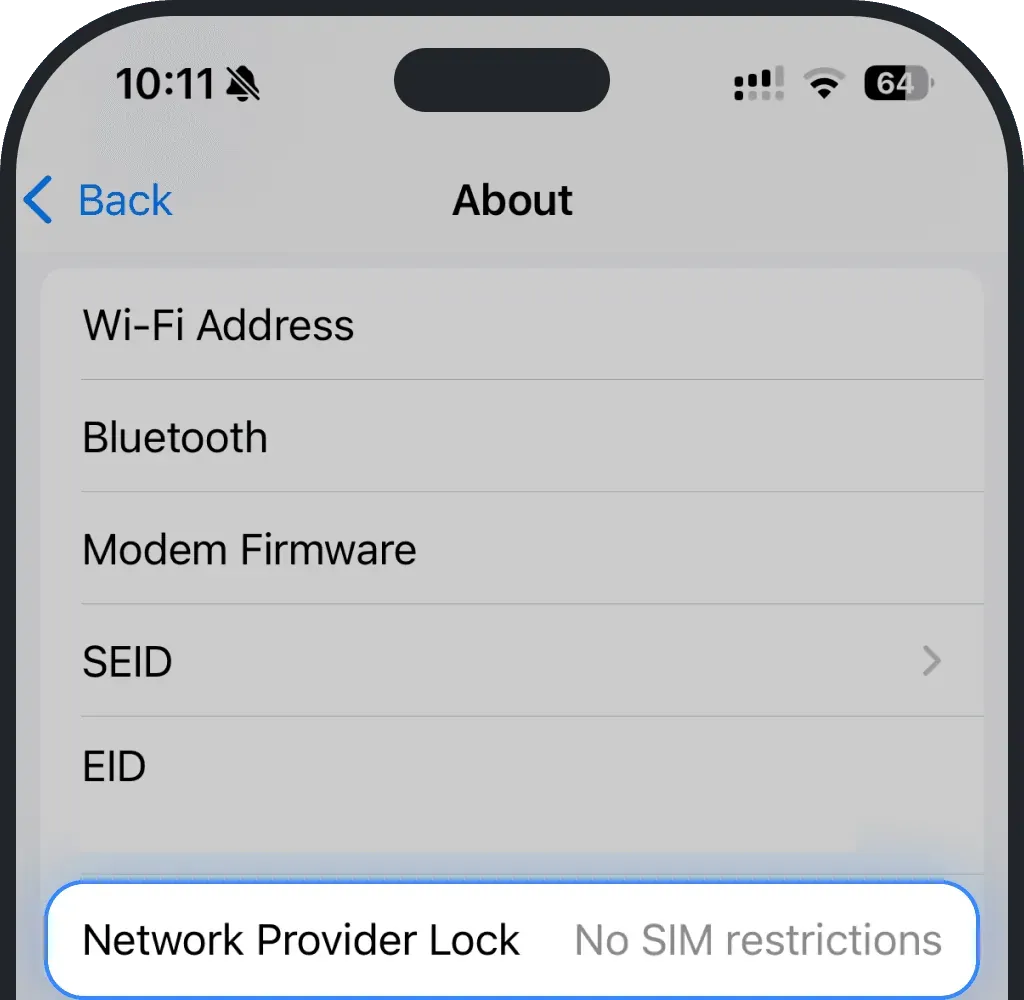
If Network Provider Lock says “No sim restrictions”, your phone doesn't have a carrier-lock.
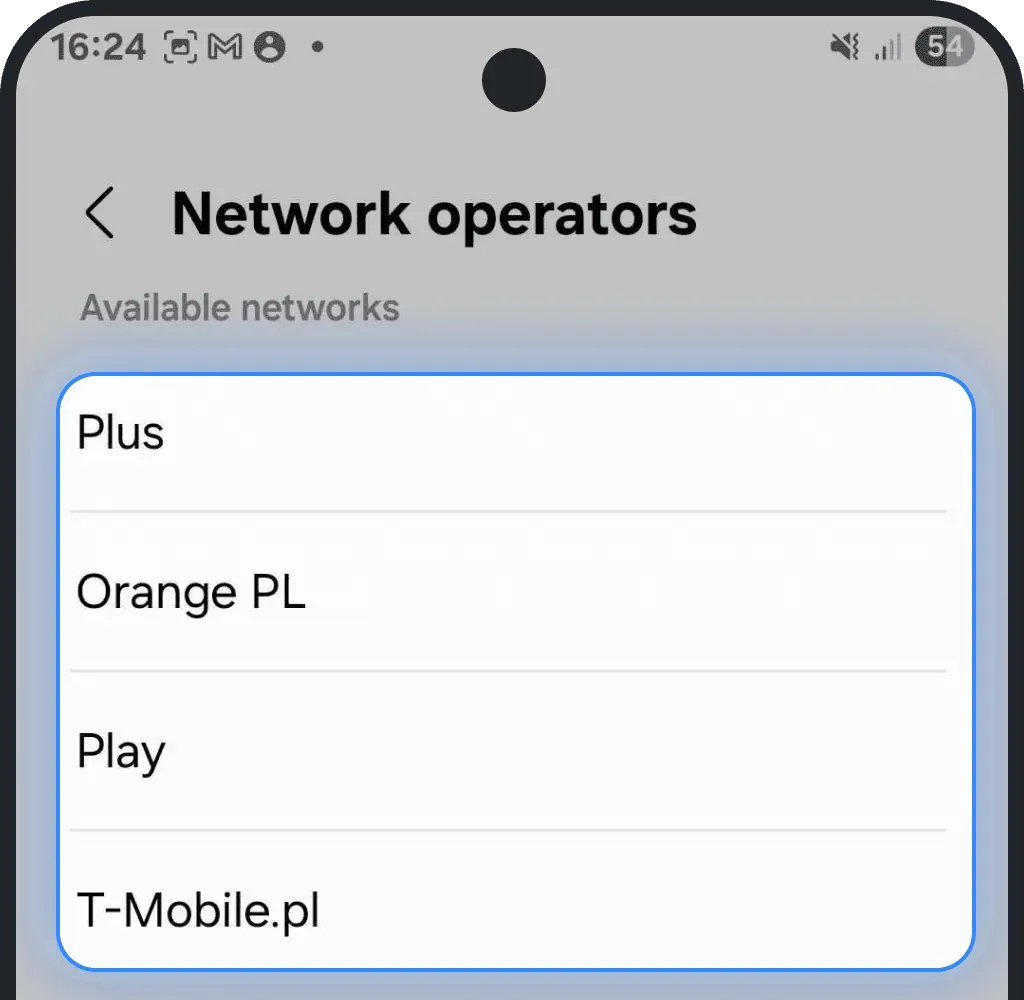
Check if your Android has a carrier-lock
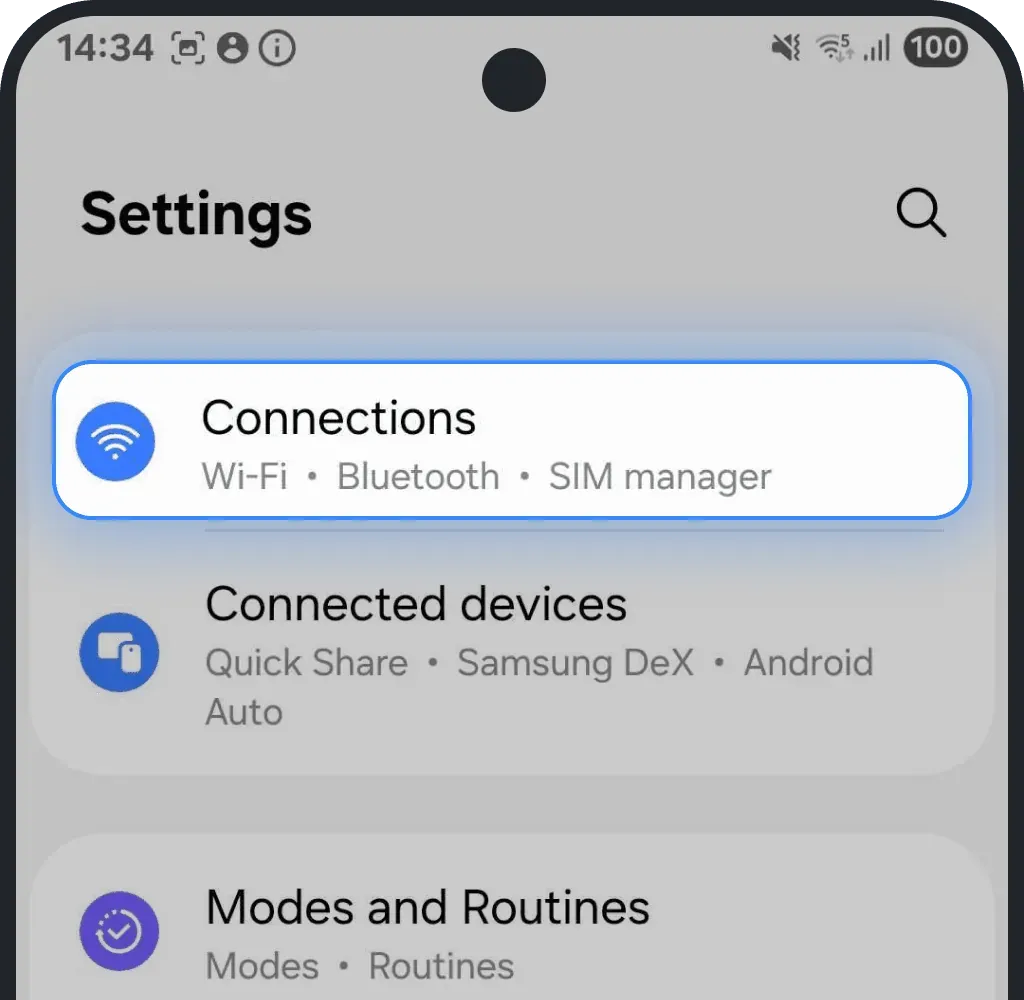
Go to Settings
Tap Connections
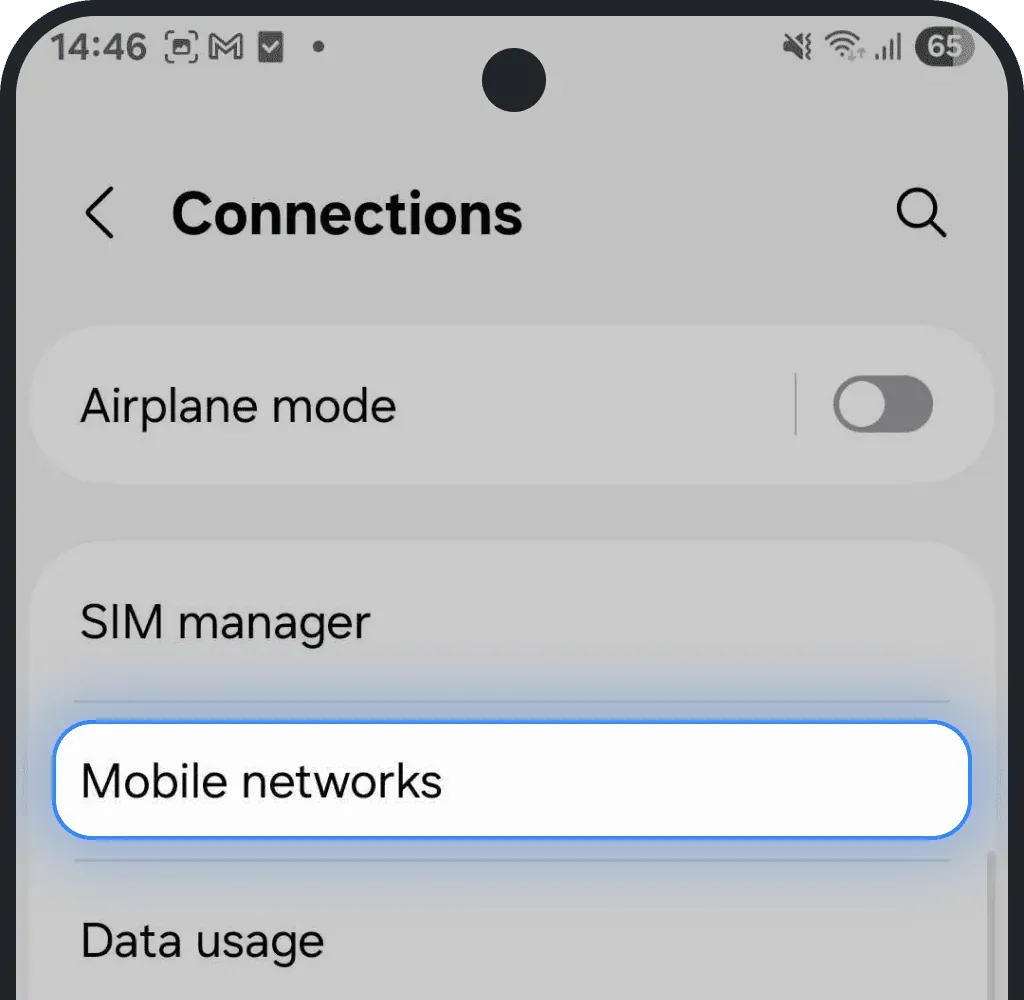
Tap Mobile networks
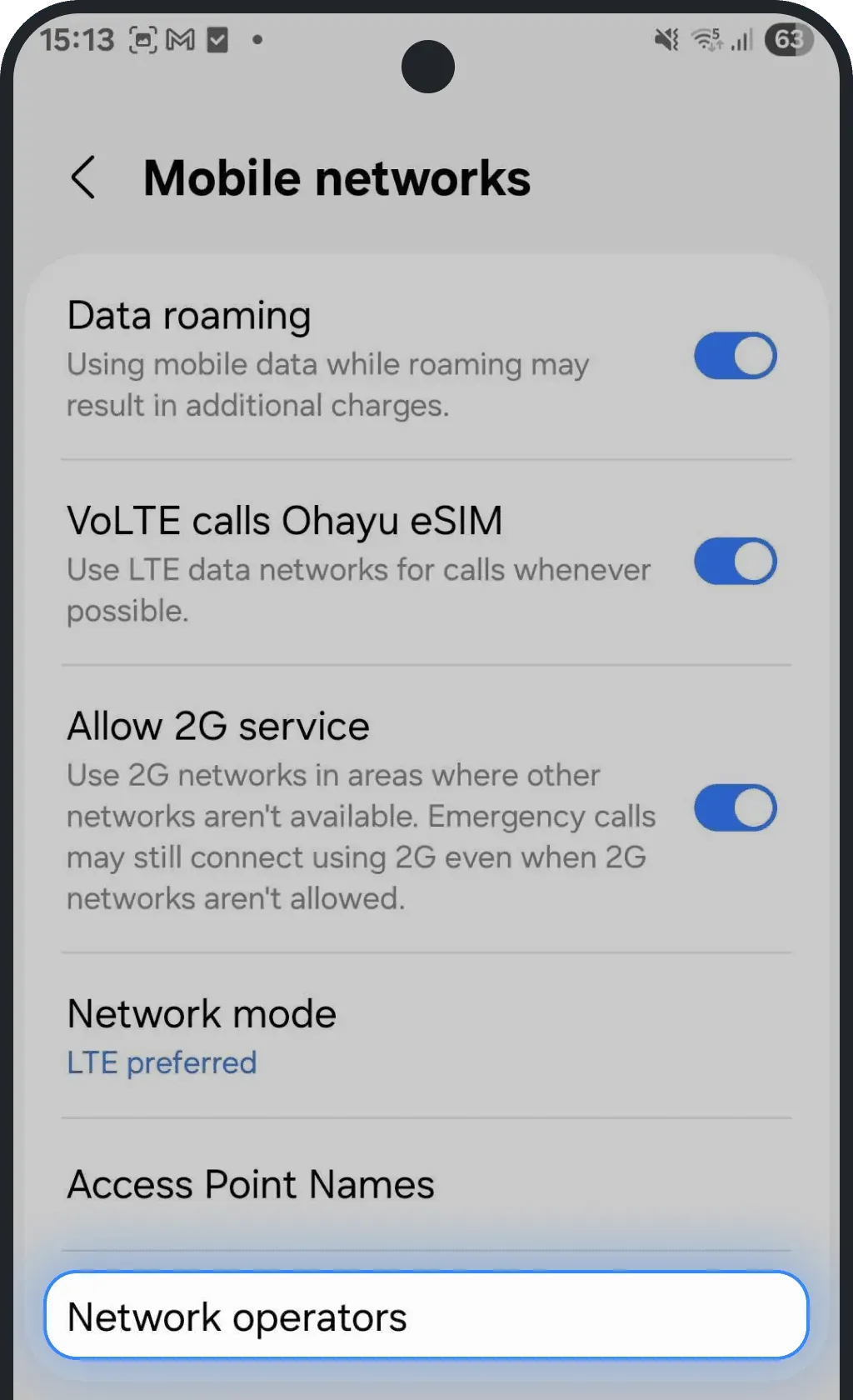
Select Network Operators
Turn off the automatic selection
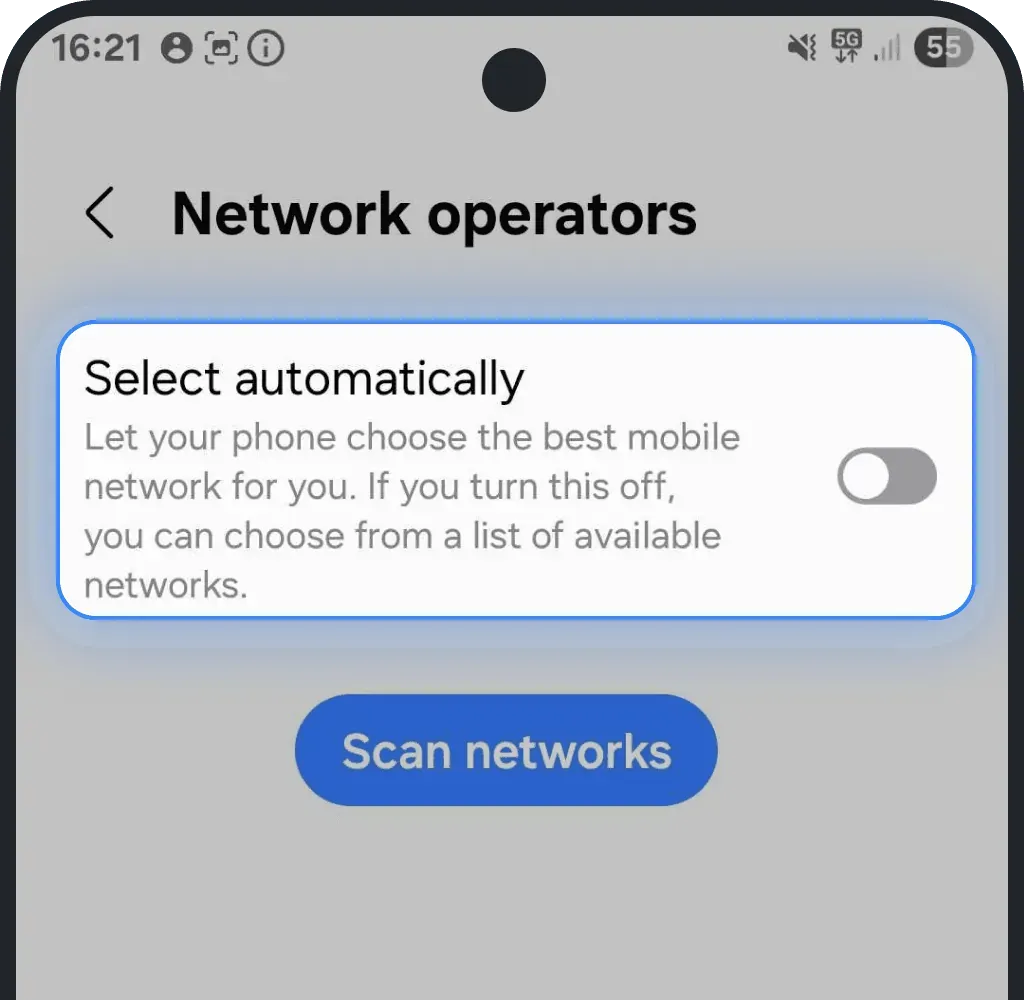
If you see several networks on the list, your phone probably doesn't have a carrier lock.
Manual check with a different SIM card
If you’re unsure, the simplest way is to try another SIM from a different carrier:
If you insert the SIM card and your phone shows signal bars, it means your device doesn't have a lock. If it shows “SIM not supported”, “Network locked”, or asks for an unlock code, your device is carrier-locked.
Check lock status through your carrier
You can always contact your mobile carrier directly and ask them if they locked your device.
Most providers can check this instantly if you provide them your IMEI number (found in Settings → About phone or by dialing *#06#).
How to unlock a carrier-locked phone
If your phone has a carrier-lock, just contact your carrier and ask them to remove the restriction. In most countries, carriers unlock your phone once you finish paying for it or complete your contract. It’s free, usually takes only a few minutes, and can be done remotely. Once your device is unlocked, you can easily use a travel eSIM abroad.
How to unlock Verizon device
Verizon locks all newly purchased devices for the first 60 days to help prevent theft and fraud. After that period, Verizon unlocks the phones — as long as no one has reported them lost, stolen, or purchased fraudulently.
- Postpaid phones: Locked for 60 days after purchase (or activation if bought from an authorized retailer). After 60 days, Verizon automatically removes the lock.
- Prepaid phones: Locked for 60 days after paid activation. Once the line has been active and in good standing for 60 days, Verizon automatically unlocks the device.
- Military exception: Active-duty military customers deployed outside Verizon’s coverage area can request an unlock once their account is verified and has been active for at least 60 days.
After the 60-day period, Verizon does not re-lock devices under any circumstances.
For full details, visit Verizon’s official policy page.
How to unlock T-Mobile device
T-Mobile locks new devices to its network until they meet specific eligibility requirements. Once your phone becomes eligible, T-Mobile unlocks it within two business days — as long as the device supports remote unlocking.
- Postpaid phones: Must be active on T-Mobile for at least 40 days, fully paid off, and linked to an account in good standing.
- Prepaid phones: Must be active for 365 days, or have over $100 in refills since activation and be active for at least 14 days.
- Military exception: Active-duty military customers can request an immediate unlock with deployment papers.
T-Mobile unlocks only the devices it sells, as long as no one has reported them lost or stolen and they meet all payment and account requirements.
For full details, visit T-Mobile’s official policy page.
How to unlock AT&T device
AT&T allows customers to unlock their devices once they meet certain eligibility requirements. Most Apple, Samsung, and Google devices automatically unlock after meeting the criteria.
- Postpaid phones: Must be active for at least 60 days, fully paid off, and linked to an account in good standing. You can’t unlock the device if someone has reported it as lost, stolen, or involved in fraud.
- Prepaid phones: Must have at least six months of paid AT&T service before becoming eligible for unlocking.
- Military exception: Active-duty military customers can request an immediate unlock by providing deployment orders.
Sign in to your myAT&T account or insert a non-AT&T SIM card to see whether your carrier has unlocked your device.
For more details and to submit an unlock request, visit AT&T’s official policy page.
Was this article helpful?
Your feedback helps us improve our FAQ